(317)516-7460
  service@ampvortex.com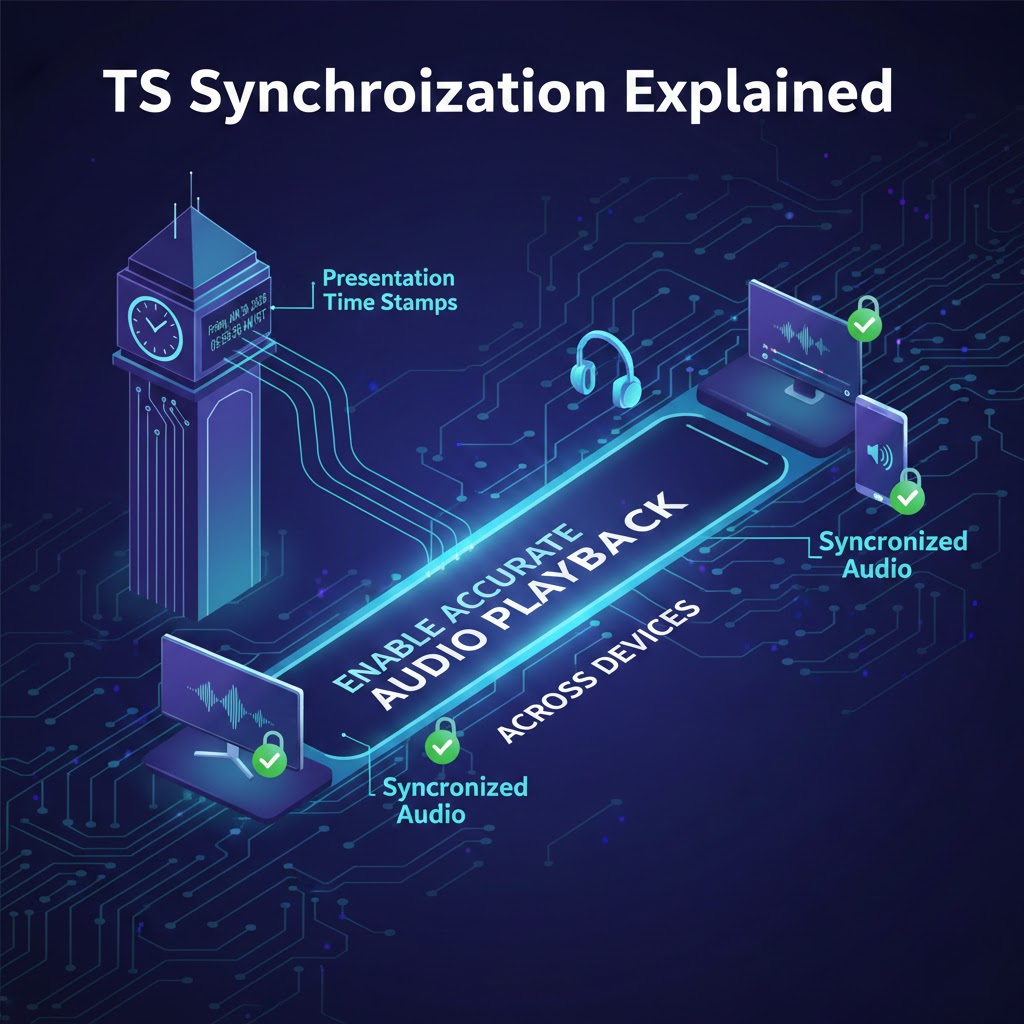
PTS Synchronization Explained: How Presentation Time Stamps Enable Accurate Audio Playback Across Devices
Introduction
When multiple speakers play the same audio at the same time, perfect synchronization feels natural.
But achieving this experience is anything but simple.
Behind almost every modern audio and video synchronization system lies a foundational concept:
Presentation Time Stamps (PTS)
PTS is one of the most important mechanisms used to ensure that audio (and video) data is presented at the correct moment in time — regardless of network jitter, buffering delays, or device clock drift.
Understanding how PTS-based synchronization works provides a deeper view into:
- Why multi-room systems can stay in sync
- How networked audio tolerates latency
- Why buffering does not necessarily mean poor synchronization
1. What Is PTS (Presentation Time Stamp)?
A Presentation Time Stamp is a timestamp attached to a piece of media data that specifies:
The exact moment when that data should be played back.
In simple terms:
PTS does not say “play this now”
PTS says “play this at time T”
Each audio frame or packet carries its own PTS value.
This decouples data arrival time from playback time.
2. Why PTS Exists
In real networks:
- Packets arrive late
- Packets arrive early
- Packets arrive in bursts
If devices played audio immediately when packets arrived, playback would be unstable and unsynchronized.
PTS solves this by allowing devices to:
- Buffer incoming data
- Read its PTS
- Schedule playback based on a clock
This transforms a chaotic network stream into a deterministic playback timeline.
3. PTS vs Clock: Two Pieces of the Same System
PTS alone is not enough.
Every playback device also maintains:
A local clock
Synchronization happens when:
Local Clock Time ≈ PTS Time
If a device’s clock is aligned with a reference clock, then two devices playing the same PTS will produce sound at the same moment.
Thus, PTS synchronization always relies on:
- Timestamps (what time to play)
- Clock synchronization (what time it is)
Both are required.
4. Basic PTS Playback Pipeline
Typical playback flow:
Receive Packet
↓
Extract PTS
↓
Store in Buffer
↓
Wait until Local Clock == PTS
↓
Output Audio
This pipeline exists in:
- Streaming players
- Media frameworks
- Multi-room speakers
- AV receivers
- Professional audio systems
5. How PTS Enables Multi-Device Synchronization
Consider two speakers receiving the same audio stream:
- Both receive packets with identical PTS values
- Both have clocks synchronized (within small error)
Result:
Both speakers schedule playback for the same PTS moment.
Even if:
- One speaker receives data earlier
- One speaker receives data later
They still play simultaneously.
Network timing differences disappear.
This is the core magic of PTS-based synchronization.
6. Buffering Does Not Break Synchronization
A common misconception:
Larger buffers mean worse synchronization.
In reality:
Buffers improve stability without harming synchronization.
Why?
Because PTS determines playback time, not buffer depth.
A device may buffer:
- 100 ms
- 500 ms
- 2000 ms
As long as it plays frames at their PTS, synchronization remains intact.
Buffering affects latency, not sync accuracy.
7. PTS in Audio vs Video
PTS originated in audio-video systems to keep lips and speech aligned.
For video:
- Each frame has PTS
- Display occurs when clock reaches PTS
For audio:
- Each audio frame has PTS
- DAC outputs when clock reaches PTS
Multi-room audio borrows the exact same principle.
8. Where PTS Values Come From
PTS values are generated by:
- Encoders
- Streaming servers
- Playback pipelines
They usually increase monotonically:
0 ms → 23 ms → 46 ms → 69 ms → …
The actual unit may be:
- Samples
- Microseconds
- Ticks
But conceptually they represent time.
9. Clock Synchronization Methods
PTS requires clocks to be reasonably aligned.
Common techniques:
- NTP-like synchronization
- PTP-like synchronization
- Protocol-specific timing packets
Small drift is expected.
Systems continuously:
- Measure drift
- Apply tiny corrections
This process is called clock discipline.
10. Drift Correction with PTS
If a device notices:
Local Clock is slightly ahead of PTS timeline
It may:
- Slightly slow playback
- Drop tiny samples
If behind:
- Slightly speed up
- Insert tiny samples
These changes are extremely small and inaudible.
Result:
Playback stays aligned over long periods.
11. PTS vs Sample-Accurate Locking
Some professional systems aim for:
- Sample-accurate synchronization
PTS-based systems are typically:
- Millisecond-level accurate
For residential multi-room audio:
- Sub-10 ms alignment is perceived as “perfectly synchronized”
PTS easily achieves this.
12. Relationship Between PTS and Multi-Room Protocols
Different ecosystems use different higher-level architectures, but:
Almost all of them rely on PTS internally.
Examples:
- AirPlay
- Google Cast
- Sonos
- DLNA / UPnP
- RTP-based systems
Their main differences are:
- Who generates the PTS
- Who controls the master clock
- How clocks are synchronized
Not whether PTS exists.
13. Why PTS-Based Systems Scale Well
PTS systems scale because:
- Each device schedules playback locally
- No device must push “play now” commands continuously
- Timing information is embedded in the stream
This enables:
- Large speaker groups
- Distributed architectures
- Robust operation over Wi-Fi
14. PTS vs Command-Based Synchronization
Command-based approach:
“Play this packet now.”
PTS-based approach:
“This packet should play at time 12,345 ms.”
PTS is superior because:
- Network jitter does not matter
- Commands do not need precise arrival timing
15. Practical Implications for System Designers
Well-designed multi-room systems:
- Use PTS-based playback
- Combine with clock synchronization
- Add buffering for stability
Poorly designed systems:
- Rely on immediate playback
- Attempt to push timing commands
- Struggle with drift
16. What Users Should Know
- Small delays before playback starts are normal
- Large buffers do not mean bad sync
- Good systems prioritize accurate PTS scheduling
If speakers start together and stay together:
PTS is doing its job.
Conclusion
PTS (Presentation Time Stamp) is the hidden foundation behind modern synchronized audio playback.
It allows:
- Data to arrive at unpredictable times
- Playback to occur at precise times
By separating when data arrives from when sound is produced, PTS makes multi-room audio, lip-sync, and networked playback possible.
Different platforms may choose different architectures, but nearly all of them rely on this same fundamental idea:
Time-stamped media scheduled against synchronized clocks.
This is the true engine of synchronization.
👉https://www.ampvortex.com/multi-room-audio-synchronization-airplay-vs-google-cast/
👉https://www.ampvortex.com/pts-clock-sync-vs-group-sync-vs-sender-sync/