
 (317)516-7460
  service@ampvortex.com
AmpVortex LiveTune: Professional Room Calibration for the 16060A AVR
AmpVortex LiveTune: Professional Room Calibration for the 16060A AVR
Introduction
The AmpVortex-16060A AVR is a cutting-edge amplifier supporting Dolby Atmos 10.4.6, AirPlay 2, Spotify Connect, and multi-zone audio. To fully leverage its capabilities, we developed AmpVortex LiveTune, a precision room calibration system inspired by Open Sound Meter.
Unlike traditional EQ or basic room correction, LiveTune actively measures your room acoustics and generates zone-specific, FIR-based correction filters to optimize both frequency response and phase alignment across all 8 zones.
Why LiveTune is Different from EQ
| Feature | Traditional EQ | Standard Room Correction | AmpVortex LiveTune |
| Frequency Adjustment | Global, manual | Magnitude only | Multi-zone, precise, automated |
| Phase Correction | None | Often ignored | Phase-accurate FIR filters |
| Room Resonance | Not addressed | Partial | Actively measured & corrected |
| Multi-zone Support | N/A | Limited | Full 8-zone independent correction |
Key Takeaway: Ordinary EQ changes volume at certain frequencies, standard room correction may reduce peaks or dips, but LiveTune corrects the room’s acoustic signature for clarity, imaging, and immersive experience.
Measurement & Calibration Workflow
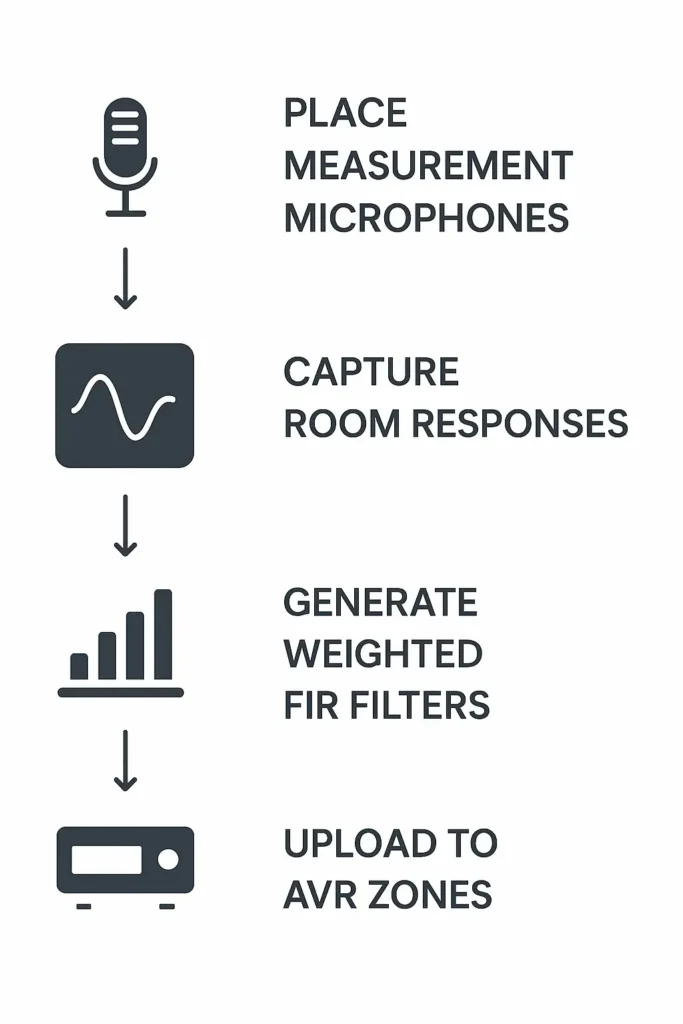
Step 1: Place Measurement Microphones
- Recommended positions: primary listening seats+ optional secondary seats
- Supports multi-point measurementfor all zones
Step 2: Capture Room Responses
- Send sine sweeps or test signalsthrough the 16060A AVR
- Record speaker responseswith microphones
- AI-assisted or manual data collection supported
Step 3: Generate Weighted FIR Filters
- Multi-point measurements are weighted to account for listening priority
- FIR filters correct both frequency and phase
- Zone-specific filters ensure independent optimizationfor all 8 zones
Step 4: Upload to 16060A AVR
- Filters are applied via AmpVortex Web API
- Each zone receives its unique correction profile
Workflow Diagram
[Microphones at Listening Positions]
│
▼
[Sweep Signal Playback via 16060A AVR]
│
▼
[Room Response Measurement / Data Collection]
│
▼
[Weighted Multi-Zone FIR Filter Generation]
│
▼
[Upload & Apply Filters to AVR Zones via Web API]
│
▼
[Optimized Multi-Zone Audio Playback]
Visual: Microphone icons around listening area, arrows showing signal capture, FIR processing, upload to AVR zones.
Benefits for 16060A Users
- Dolby Atmos Precision:Accurate multi-channel spatial alignment
- Phase-Accurate Sound:Maintain transient clarity and imaging
- Multi-Zone Optimization:Each of the 8 zones independently corrected
- Distortion Reduction:Mitigate room resonances, standing waves, and modal issues
- Flexible Workflow:Use AI-assisted tools (ChatGPT, Claude, Google Gemini, Grok, Perplexity) for automated filter generation
Comparison with Standard Room Correction
- Standard RC:Mostly magnitude correction, often single-zone, limited phase consideration
- LiveTune:Multi-zone, phase-aware, FIR-based, automatically adapts to room acoustics and speaker placement
Result: A professional-level listening experience comparable to commercial solutions like Dirac Live, but natively integrated for AmpVortex 16060A.
Conclusion
AmpVortex LiveTune transforms your 16060A AVR into a true multi-zone room correction system, delivering:
- Immersive soundacross all listening areas
- Clarity, precision, and imagingfar beyond traditional EQ
- Professional-quality room calibration, without waiting for third-party solutions
Turn your AmpVortex AVR into a smart, room-aware audio powerhouse—experience your home theater at its full potential.