
 (317)516-7460
  service@ampvortex.com
30-Minute Guide: Build a Lossless Whole Home Audio System
30-Minute Guide: Build a Lossless Whole Home Audio System
with AmpVortex Web API + Built-in AirPlay 2 + Home Assistant × Music Assistant
Why Do This? (The 30-Second Pitch)
-
Zero extra boxes – AmpVortex amps already ship with native AirPlay 2, so no Apple TV, AirPort Express or third-party dongles needed
-
Zero quality loss – entire chain stays at ALAC 44.1 kHz/16-bit with millisecond-grade multi-room sync
-
Zero app hopping – Music Assistant unites local FLAC, NAS, Apple Music, Spotify, Tidal (and more) into one library you can drive from HA, voice or NFC
-
Zero lock-in – every zone appears as a standard HA
media_playerentity; automate, script or expose to Siri/Google as you like -
Zero hassle scaling – need 16 rooms? Stack two AmpVortex units; the second is auto-discovered and still one API surface
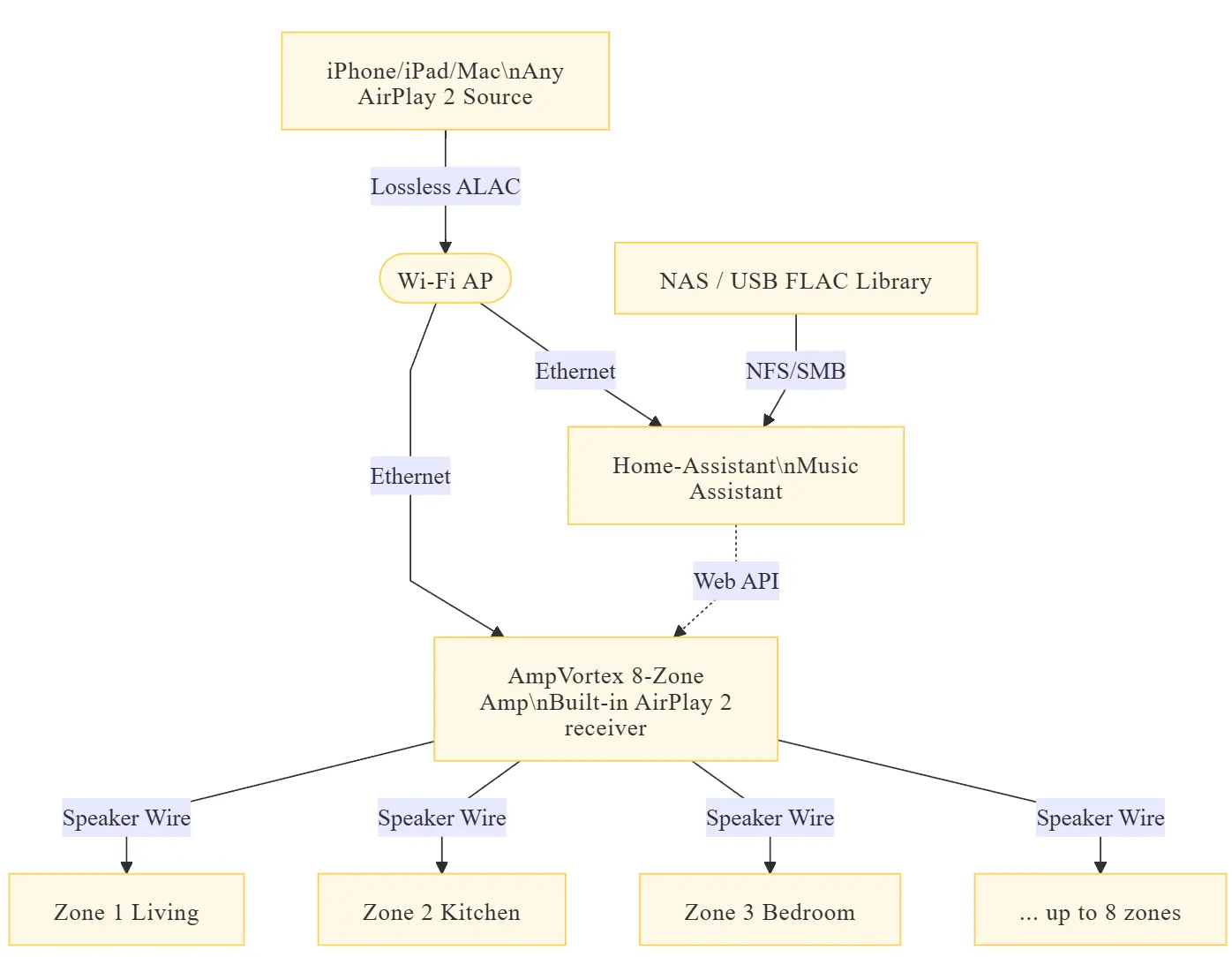
Topology at a Glance
30-Minute Step-by-Step
0. Network & AmpVortex
-
Plug AmpVortex into router → DHCP assigns IP
-
Open AmpVortex app → rename zones → Settings → Network → enable Web API → copy IP and Bearer token
1. Install Music Assistant (HA)
Settings → Devices & Services → Add Integration → Music Assistant → reboot
Music → Settings → add
Music → Settings → add
/media/music or NAS → log in Apple Music / Spotify → done2. Import AirPlay 2 Zones into MA
Music → Player Providers → AirPlay → ADD
MA auto-finds
MA auto-finds
AmpVortex-Z1@Living … Z8@Patio → select all → SAVE3. (Optional) REST-API Power/Volume Control
rest:
– resource: https://<AMP_IP>/api/v1/zone/1
headers: {Authorization: “Bearer <TOKEN>”}
media_player:
– name: AmpVortex_Z1
device_class: speaker
state_template: “{{ value_json.state }}”
volume_template: “{{ value_json.volume }}”
turn_on:
service: rest_command.amp_z1_on
turn_off:
service: rest_command.amp_z1_off
set_volume:
service: rest_command.amp_z1_vol
data: {volume: “{{ volume }}”}
Restart HA → you now have
media_player.ampvortex_z1 entity.4. Dashboard & Automations
-
Card: Mini Media Player stack → one row, eight zones, long-press sliders
-
Sample automation: 22:30 if any zone == playing → volume_set to 15 %
-
NFC tag at door → group Zone1&Zone2 → TTS “Welcome home” → resume playlist
Quick Troubleshooting
| Problem | Fix |
|---|---|
| iPhone can't see AmpVortex | Same VLAN, disable VPN, toggle "AirPlay Visible" in amp app |
| Multi-room lag >200 ms | Set AirPlay buffer to "Low" in amp app; enable sync correction in MA |
| MA won't scan NAS | Mount NAS to /media/nas, restart MA filesystem provider |
| Web API 401 | Header must be Authorization: Bearer |
Power-User Ideas
-
Siri: add zones to Apple Home → “Hey Siri, play jazz in the kitchen”
-
Auto loudness: Node-RED reads SPL sensor → ‑6 dB after 23:00
-
Scale to 16 zones: LAN2→LAN1 cascade second AmpVortex → auto-discovered
Done—enjoy your new lossless, multi-room, fully-open Home-Assistant-ready audio backbone!