
 (317)516-7460
  service@ampvortex.com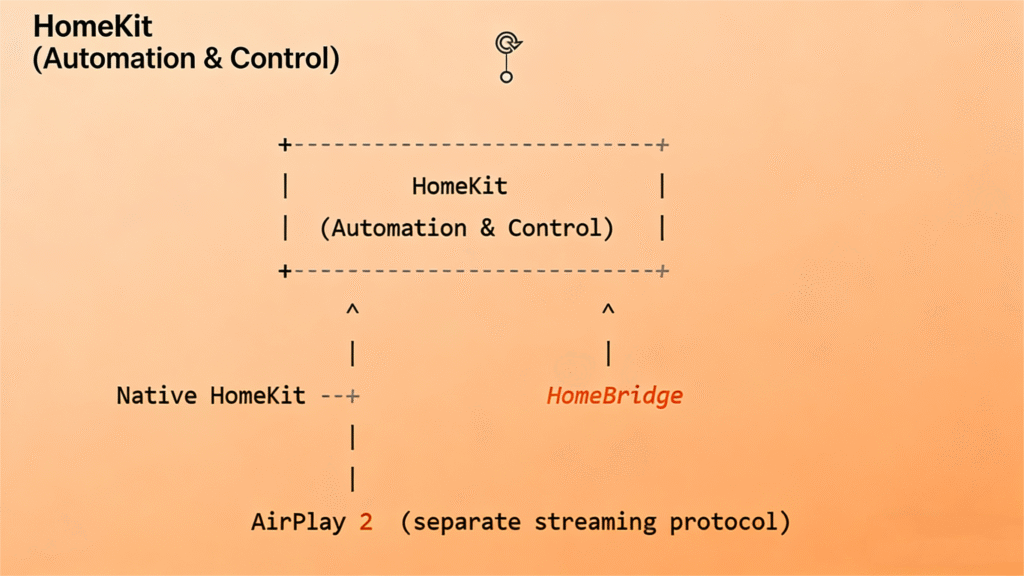
HomeKit, AirPlay 2, and HomeBridge: Understanding Their Relationship and How They Integrate with Home Assistant
Apple’s smart home ecosystem is built around several different technologies—HomeKit, AirPlay 2, and HomeBridge—each serving a different purpose. These technologies often get grouped together, yet their capabilities and limitations vary significantly, especially when integrating with open systems like Home Assistant.
This article provides a clear, practical explanation of:
& What each technology is
& How they relate to each other
& Which ones can be integrated with Home Assistant
& Why some can be auto-discovered while others cannot
& And what this means for modern smart audio platforms like AmpVortex
Let’s break it down clearly.
1. What HomeKit Really Is
HomeKit is Apple’s smart home automation framework, built on the HomeKit Accessory Protocol (HAP). It defines:
& Device categories (lights, switches, locks, thermostats, etc.)
& Encrypted pairing
& Automations via Apple Home App
& Siri control
& Apple Hub (HomePod / Apple TV) support
HomeKit comes in two forms:
1). HomeKit Accessory
A hardware device that implements HAP natively.
2). HomeKit Bridge
A bridge exposes multiple non-HomeKit devices into Apple Home as if they were native HomeKit devices.
2. What AirPlay 2 Is — and Why It’s NOT HomeKit
AirPlay 2 is not part of HomeKit.
It is Apple’s proprietary audio/video streaming protocol designed for:
& Multi-room synchronized audio
& Streaming from iPhone/iPad/Mac
& Low latency playback
& Apple Music integration
AirPlay 2 does not:
& Provide device entities
& Support pairing into Home Assistant
& Expose switches, sensors, or controlable services
& Allow third-party receivers without certification
A device can support:
& Only AirPlay 2
& Only HomeKit
& Both
& Neither
There is no requirement for an AirPlay 2 speaker to be a HomeKit device.
3. What HomeBridge Is — and Why It Exists
HomeBridge is not from Apple.
It is an open-source Node.js platform that emulates a HomeKit Bridge.
HomeBridge’s purpose is simple:
Allow non-HomeKit devices to appear inside Apple Home.
It uses plugins to expose:
& Sensors
& Switches
& Cameras
& TVs
& Smart plugs
& IR controllers
However, it cannot add AirPlay 2 support nor can it convert non-HomeKit audio devices into real AirPlay speakers.
4. How These Three Technologies Relate
Here’s the simplest visual model:
Key relationships:
& HomeKit ≠ AirPlay 2
& AirPlay 2 devices are not HomeKit devices
& HomeBridge emulates HomeKit, not AirPlay
& Home Assistant can integrate with HomeKit, but not AirPlay 2
& HomeBridge acts as compatibility glue between HomeKit and non-HomeKit devices
5. Can These Technologies Integrate with Home Assistant?
 HomeKit Accessory → Home Assistant
Yes. Fully supported.
Home Assistant includes HomeKit Controller, allowing HA to pair with HomeKit devices just like an iPhone—no Apple hub required.
HomeKit Bridge → Home Assistant
Yes. Supported.
HA can pair with HomeBridge and import the bridged devices directly.
 AirPlay 2 → Home Assistant
No. Not supported.
Why?
& AirPlay 2 is a closed and encrypted protocol
& Receivers require Apple certification
& Home Assistant cannot act as an AirPlay receiver or synchronized speaker
& No third-party library can legally or fully decode AirPlay 2
Home Assistant can discover AirPlay devices (via RAOP),
but cannot integrate them like Google Cast or Sonos.
6. Then Why Can Google Cast Be Auto-Discovered in Home Assistant?
You noticed your Google Cast devices appear automatically in HA, but HomeKit or AirPlay 2 devices do not.
This is because Google Cast is built on open, broadcast-based discovery protocols.
Google Cast uses:
& Zeroconf / mDNS (_googlecast._tcp.local)
& DIAL protocol
& Cast v2 API (openly reverse engineered)
Home Assistant listens for these broadcasts and instantly recognizes:
& Chromecast
& Nest Hub
& Nest speakers
& Google TV
& Third-party Cast-enabled speakers
Thus HA can:
& Auto-discover them
& Automatically load the Google Cast integration
& Create usable media player entities
& Control playback, volume, apps, etc.
Why AirPlay 2 doesn’t behave this way:
& AirPlay 2 ≠ open
& AirPlay 2 ≠ broadcast its full capabilities
& AirPlay 2 ≠ allow third-party receivers
& AirPlay 2 ≠ allow device pairing outside Apple ecosystem
Why HomeKit doesn’t behave this way:
& HomeKit requires pairing
& Devices already paired with Apple Home must be reset
& HA cannot “take over” an already paired HomeKit device