
 (317)516-7460
  service@ampvortex.com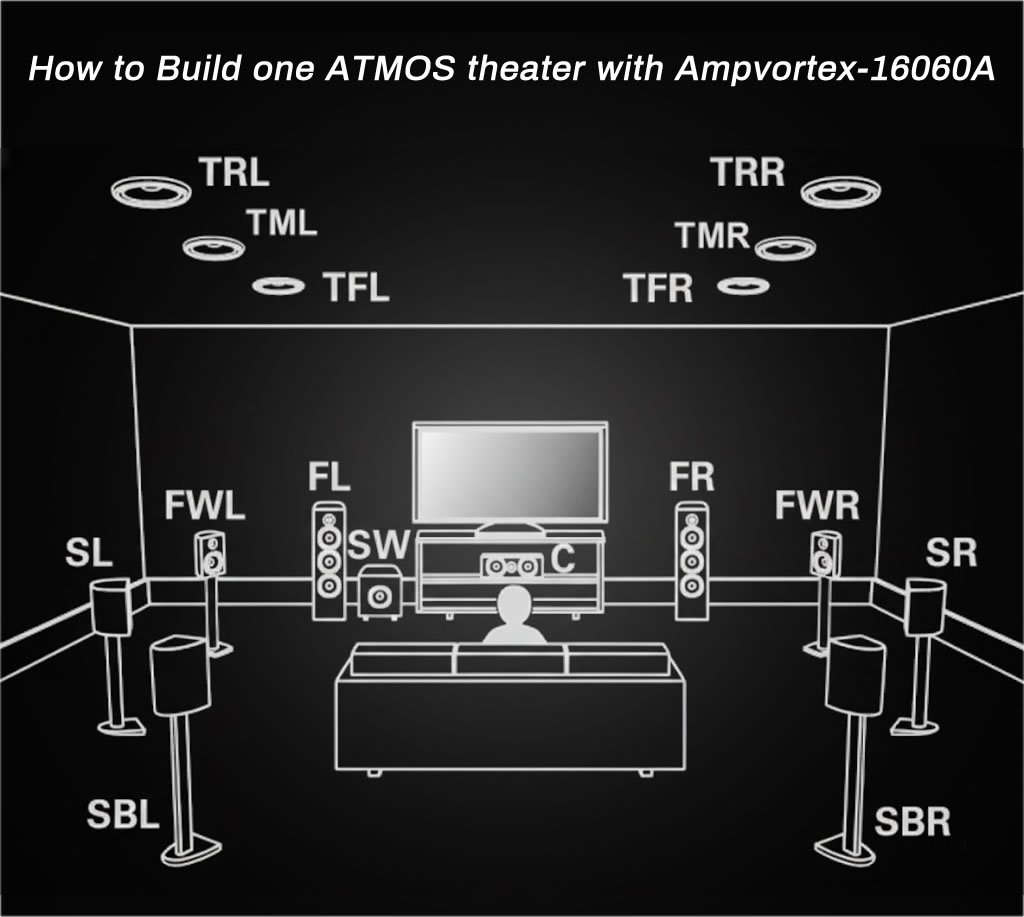
How to Build one ATMOS theater with Ampvortex-16060A
Your Ultimate Home Theater and Multi-Zone Solution
Searching for the single best audio solution that expertly marries a cinema-grade Dolby Atmos experience with robust whole-house streaming? The AmpVortex-16060A is designed precisely for this convergence. Unlike traditional AVRs that force a compromise between home theater performance and multi-room audio, the 16060A provides seamless, high-fidelity sound, supporting intricate configurations like 9.1.6 and even 10.4.6. It stands as the premier choice for enthusiasts who demand both cinematic immersion and synchronized, lossless audio throughout their entire smart home.
Pre-Installation Setup Checklist
To ensure a smooth, professional-grade installation and unlock the full potential of your AmpVortex-16060A, we highly recommend purchasing and thoroughly reviewing the User Manual before connecting any components.
Paying special attention to the following critical sections will eliminate common setup delays:
- Chapter VII: Surround Sound Input: Understand the optimal HDMI eARC/ARC and input routing methods for maximum Dolby Atmos metadata throughput from your source devices (TV, Blu-ray, Console).
- Chapter VIII: Output Configuration: This section is vital for planning your speaker layout (e.g., 5.1, 7.1, 9.1.6) and correctly assigning the 16 available channels to your specific ceiling speakers, subwoofers, and main zone loudspeakers.
By reviewing these chapters in advance, you can ensure a professional, optimized, and lag-free cinematic experience right from the start.
VII. Surround Sound Input
This section details the critical interfaces used to connect external video sources and receive high-fidelity, multi-channel audio signals for processing and playback by the AmpVortex-16060A.
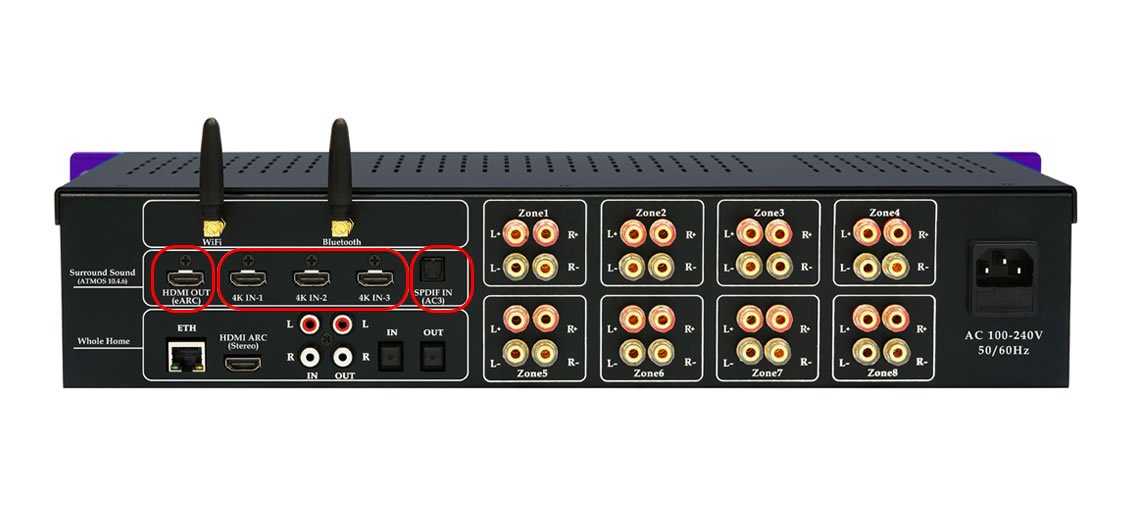
A. Input Interfaces and Selection
| Interface | Function and Source | Role in System |
| HDMI 4K In (1, 2, 3) | Connects primary video and audio sources (e.g., Blu-ray players, gaming consoles, streaming boxes). | Provides 4K video pass-through while simultaneously receiving the highest bandwidth immersive audio streams. |
| HDMI OUT (eARC) | Connects to the TV/Display. | Transmits video to the display and utilizes eARC (enhanced Audio Return Channel) to receive full-resolution immersive audio signals back from the TV (e.g., from smart TV apps). |
| SPDIF Input(AC3) | Connects external or legacy audio sources via TOSLINK cable. | Receives standard digital audio streams, primarily ensuring compatibility with older source components. |
B. Supported Immersive and Surround Formats
The AmpVortex-16060A is engineered with comprehensive decoding capabilities to handle the widest range of cinematic and broadcast content, ensuring future-proof performance while maintaining backward compatibility.
Processor Supported Core Dolby Formats
Our processor supports the following core Dolby formats, ensuring optimal audio quality and compatibility across various sources and playback scenarios:
Dolby Atmos: This is the current, market-leading standard. It is object-based, meaning individual sounds (objects) can be precisely positioned and moved anywhere in the three-dimensional space, including overhead.
- Delivery:Delivered using a Dolby TrueHD or Dolby Digital Plus (E-AC-3) container.
- System Configurations:Adds height channels, resulting in configurations like 5.1.2, 7.1.4, or your AmpVortex-16060A’s supported 4.6.
Dolby TrueHD: A high-definition, lossless audio codec. It preserves the sound quality of the original studio master recording.
- Delivery:Typically found on Blu-ray and UHD Blu-ray discs. It often carries the Dolby ATMOS object data (metadata) alongside the channel data.
Dolby Digital Plus (E-AC-3): An enhanced, more efficient version of Dolby Digital. It supports more channels (up to 7.1) and higher bitrates than standard Dolby Digital.
- Delivery:Widely used by streaming services (like Netflix and Amazon Prime Video) and digital broadcasts. It is the primary container used to deliver Dolby ATMOS over streaming.
Dolby Digital (AC-3): The original discrete multi-channel format (usually 5.1). It uses compression to deliver surround sound data efficiently.
- Delivery:The industry standard for DVDs and basic digital broadcasting.
C. Use Case Example: Immersive Movie Night (5.1.2)
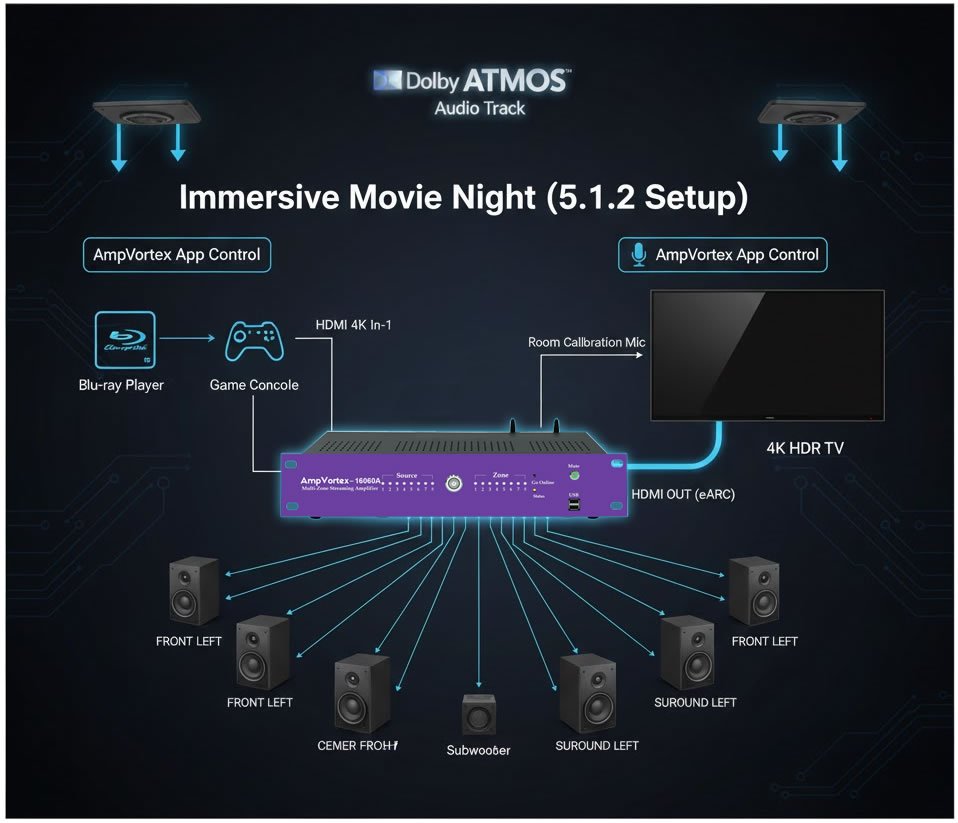
This example demonstrates how to set up the AmpVortex-16060A to deliver a 4K video signal to your display while decoding and processing a Dolby Atmos audio track for a 5.1.2 speaker configuration.
| Step | Connection / Action | Function |
| 1. Function | Connect the Blu-ray Player to the HDMI 4K In-1 port. | AmpVortex receives the high-resolution 4K video signal and the encoded Dolby Atmos audio track. |
| 2. Video Output | Connect the HDMI OUT (eARC) port to the TV/Display’s HDMI input. | The 4K video signal is passed through untouched to the screen for viewing. |
| 3. Audio Processing | In the AmpVortex setup menu, confirm the speaker configuration is set to 5.1.2. | The AmpVortex internal processor decodes the Atmos track and downmixes/maps the object-based audio to the seven primary speakers and two height channels. |
| 4. Result | The Blu-ray player delivers cinematic video, and the AmpVortex drives the speakers to provide a precise, immersive 5.1.2 sound field. |
VIII. OutPut Configutation
1. Overall Introduction
The AmpVortex-16060A features a robust array of physical outputs, including 16 channels of amplifier output, along with auxiliary digital and analog options.
| Output Type | Count | Description |
| Amplifier Channels | 16 | High-power output for speakers (up to 1040W total). |
| Analog Outputs | 2 | Line Out (Stereo, linked to Zone 1). |
| Digital Outputs | 2 | SPDIF Output (Optical, stereo only). |
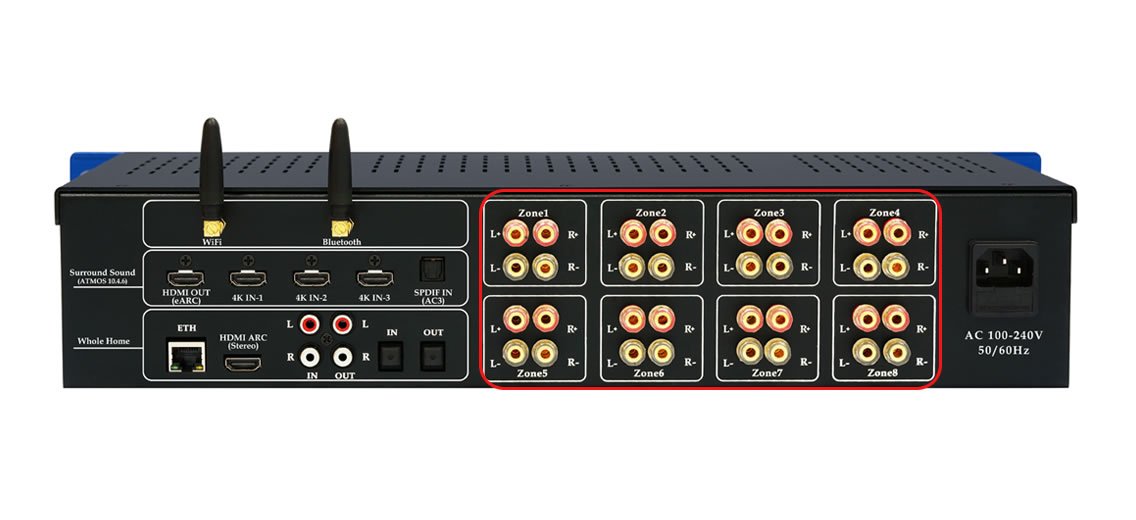
The AmpVortex-16060A streaming amplifier features two speaker outputs per zone, with one dedicated to the left speaker and another to the right speaker. Each speaker has two terminals, one positive and one negative. To fully utilize all 8 zones on the amplifier, you’ll need a total of 16 speakers. All speakers should be connected to the phoenix terminal at the back of the amplifier.

1) Amplifier Output
The back panel of the AmpVortex-16060A features 8 zones, 16 channels, and 32 binding posts, which can become quite congested.
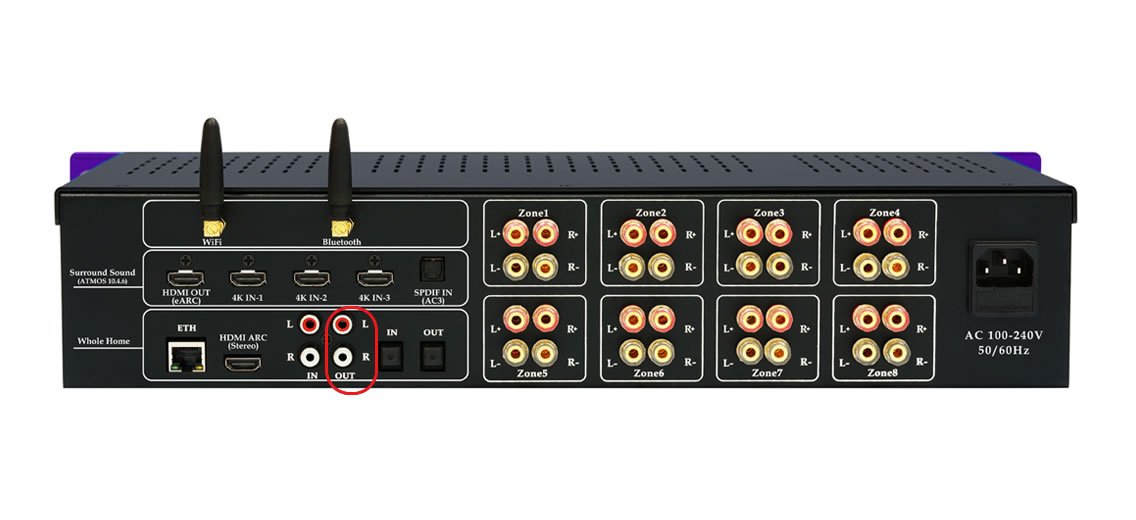
2) Line Out
Line Output is analog output signal, and is bond to Zone1 Outputs. You can use it to driver afterward amplifier or active speaker with RCA analog in interface. You can configure it as two subwoofer output to build 2.1 music playback for two zones.
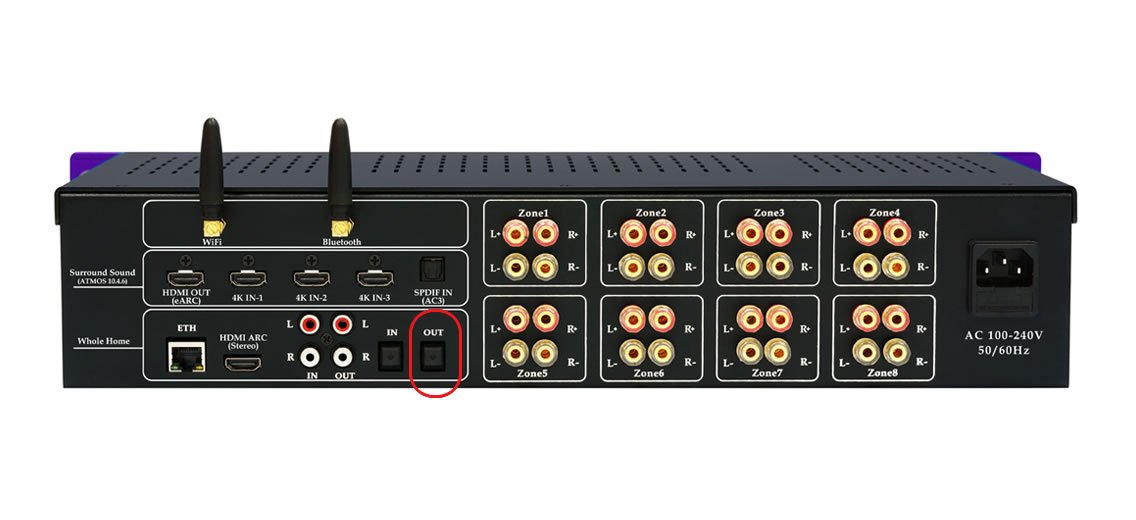
3) Optical Out
Optical output use interface, and is bond to Zone1 output. You can use it to driver afterward amplifier or active speaker with Optical in interface. You can configure it as two subwoofer output to build 2.1 music playback for two zones.
The true power of the AmpVortex-16060A lies in its flexible channel assignment. The unit can be configured in various modes to dedicate channels to either Immersive (AVR) or Distributed (Multi-Room) audio.
Use Case Example: Hybrid Mode (Theater + multi-Room)
When you configure a dedicated Theater (5.1) setup, only 6 amplifier channels are utilized. This leaves the remaining 10 channels available to power five separate Multi-Room Stereo Zones, ensuring optimal power delivery for both your main entertainment area and the rest of the house simultaneously.
Cinema and Zone Channel Distribution – Case Examples
| Case | Main Room Cinema Setup | Channels Used in Main Room | Remaining Channels | Zone Allocation Example (Remaining Channels) |
| 1 | 9.1.6 Atmos (Front LCR + Wide Channels + Side Surrounds + Rear Surrounds + Sub + 6 Height Channels) | 16 | 0 | None |
| 2 | 7.1.4 Atmos (Front LCR + Side Surrounds + Rear Surrounds + Sub + 4 Height Channels) | 12 | 4 | Zone 1: Bedroom Stereo Zone 2: Living Room Stereo |
| 3 | 7.1.2 Atmos (Front LCR + Side Surrounds + Rear Surrounds + Sub + 2 Height Channels) | 10 | 6 | Zone 1: Bedroom Stereo Zone 2: Study Stereo Zone 3: Dining Room Stereo Zone 4: Terrace Stereo Zone 5: Kitchen Mono Zone 6: Balcony Stereo |
| 4 | 5.1.4 Atmos (Front LCR + Surround L/R + Sub + 4 Height Channels) | 10 | 6 | Zone 1: Bedroom Stereo Zone 2: Study Stereo Zone 3: Dining Room Stereo Zone 4: Terrace Stereo Zone 5: Kitchen Mono Zone 6: Balcony Stereo |
| 5 | 5.1.2 Atmos (Front LCR + Surround L/R + Sub + 2 Height Channels) | 8 | 8 | Zone 1: Bedroom Stereo Zone 2: Study Stereo Zone 3: Dining Room Stereo Zone 4: Terrace Stereo |
| 6 | 5.1 Standard Cinema (Front LCR + Surround L/R + Sub) | 6 | 10 | Zone 1: Bedroom Stereo Zone 2: Study Stereo Zone 3: Dining Room Stereo Zone 4: Terrace Stereo Zone 5: Bathroom Mono (optional) |
| 7 | 0.0.0 Pure Multi-Room (No Cinema) | 0 | 16 | Zone 1: Bedroom Stereo Zone 2: Study Stereo Zone 3: Living Room Stereo Zone 4: Dining Room Stereo Zone 5: Kitchen Stereo Zone 6: Balcony Stereo Zone 7: Bathroom Stereo Zone 8: Terrace Stereo |
2. Surround Zone Access to Multi-Room Sources
The AmpVortex-16060A is designed for seamless integration across all listening environments. Even when configured for immersive cinematic playback (e.g., 5.1.2 or 10.4.6), your Theater/Surround zone remains fully accessible to all standard Multi-room Streaming Sources.
Multi-Room to Theater: Sources streamed via AirPlay 2, Spotify Connect, or DLNA can be routed directly to the Theater/Surround system.
Stereo Limitation: When playing these Multi-room Streaming Sources, the processor defaults to Stereo Mode (2.0 or 2.1), bypassing the complex immersive decoding to ensure audio synchronization across all zones. This allows the Theater to be a unified part of the whole-home music environment.
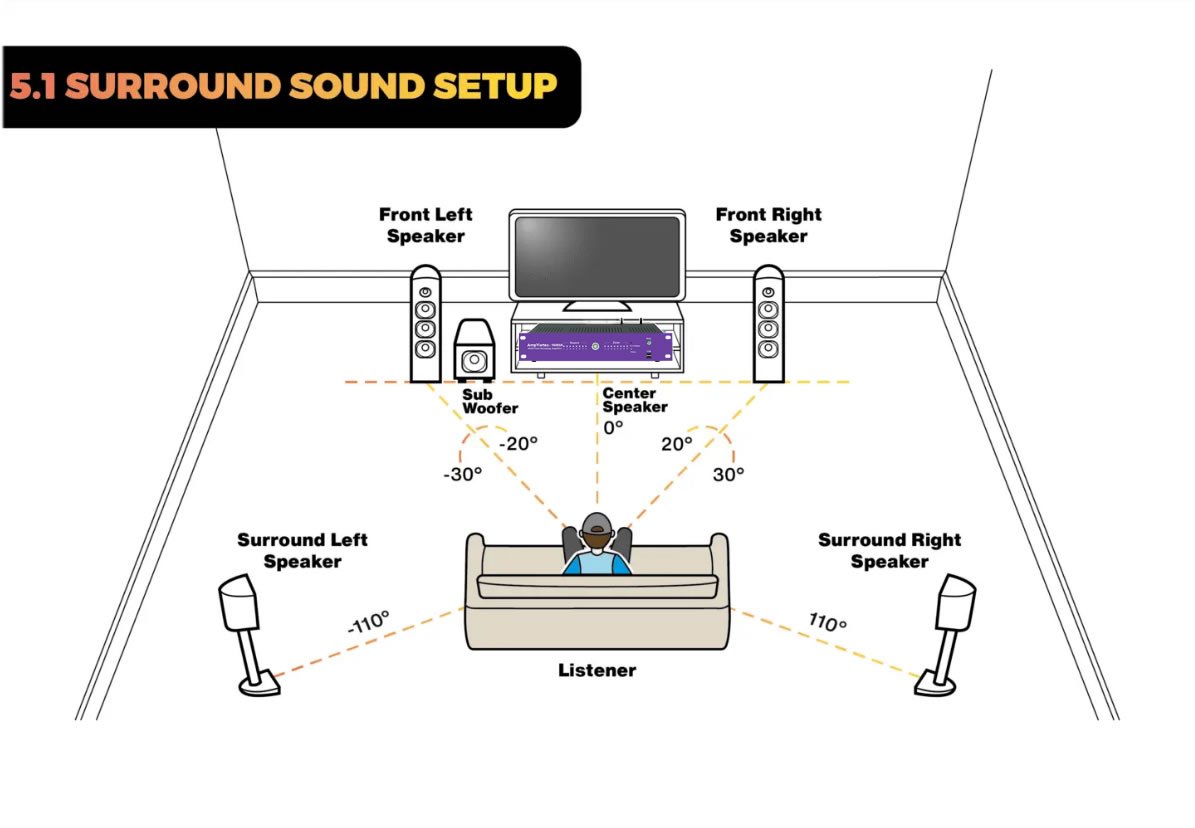
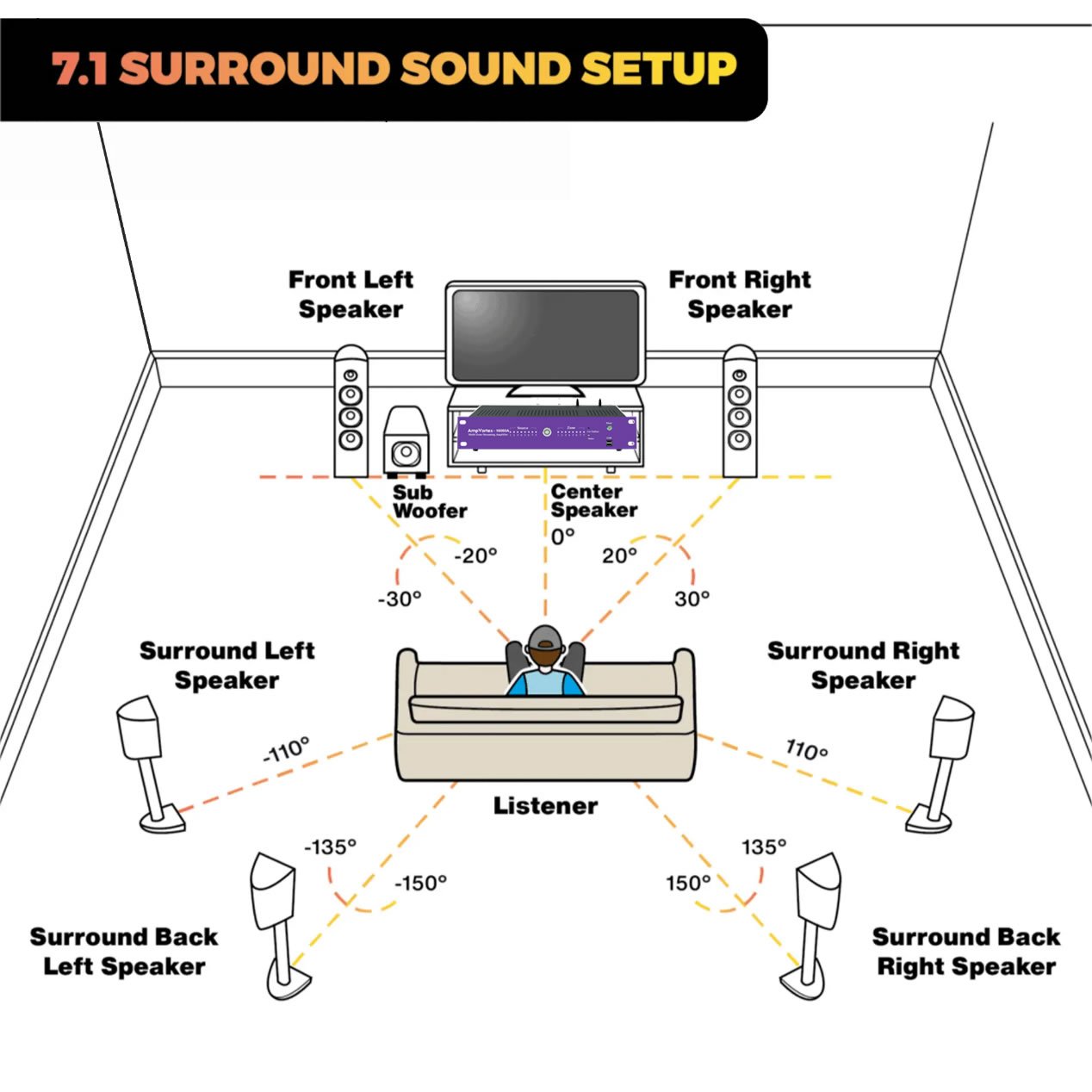
3. Typical Theater Surround configuration
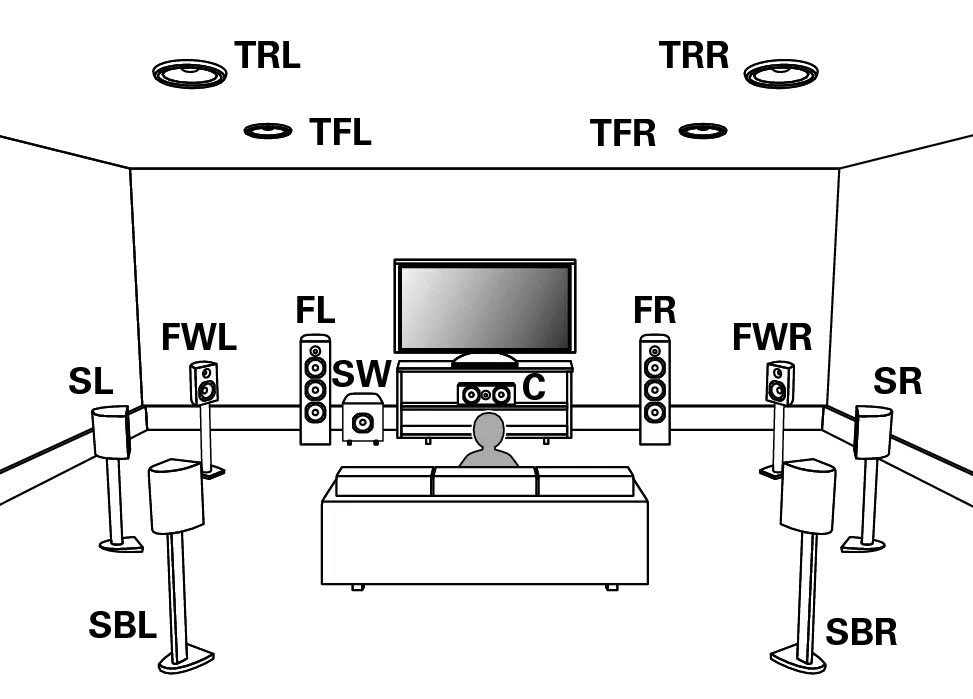
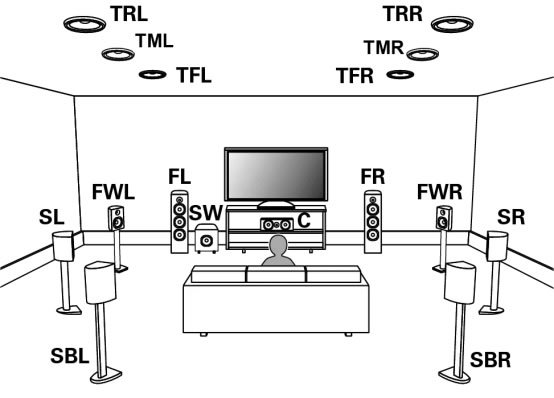
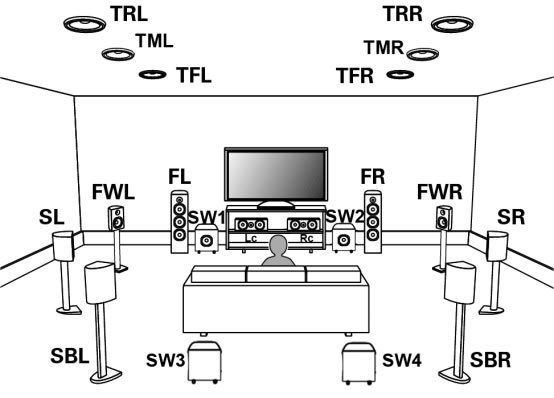
This section outlines the common speaker arrangements supported by the AmpVortex-16060A’s powerful processor, showcasing its ability to drive cinema-grade immersive audio.
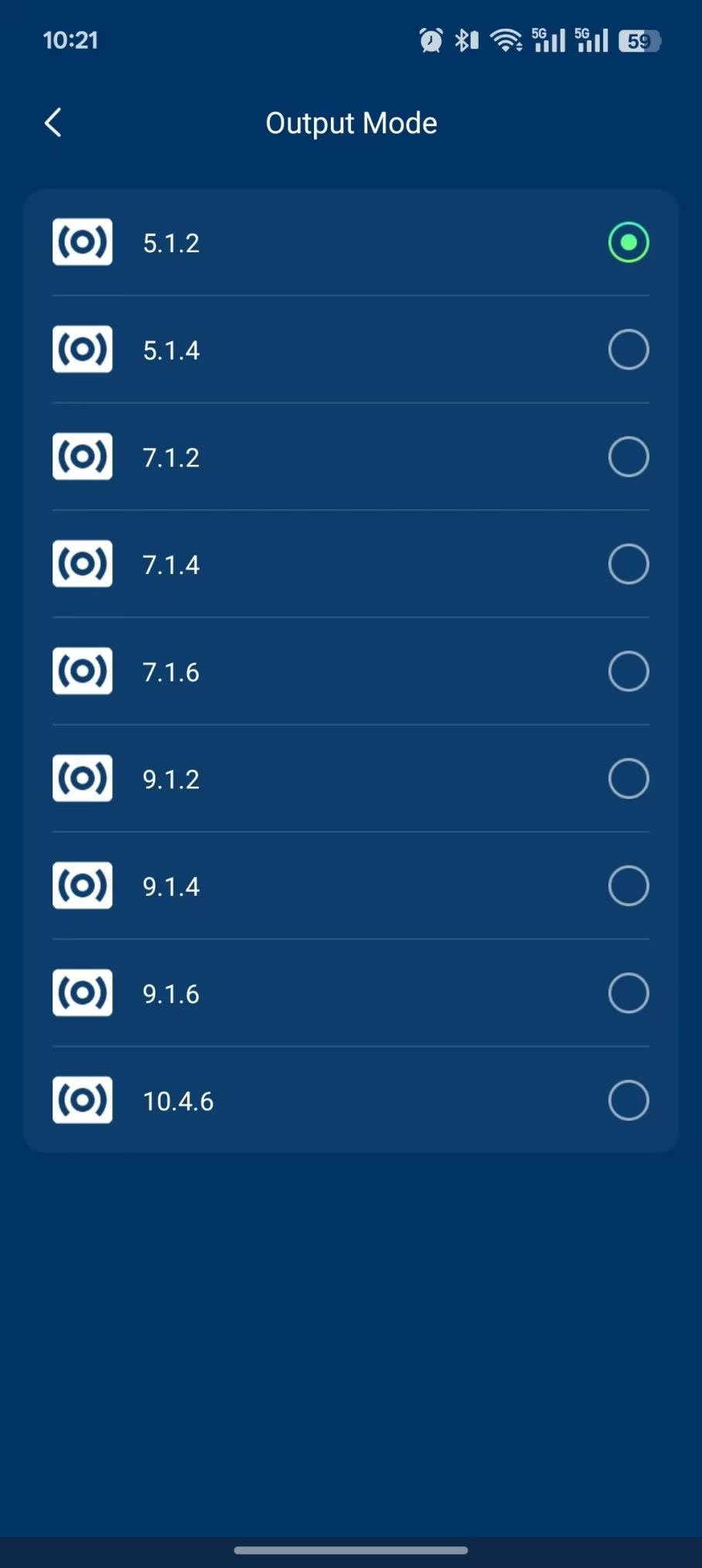
The AmpVortex-16060A supports a wide range of Dolby-enabled configurations, from traditional channel-based setups to complex object-based systems. Utilizing its 16 total amplifier channels, the unit can scale up to the advanced 10.4.6 layout, providing unparalleled precision in three-dimensional sound placement.
Common configurations, such as 5.1, 7.1, 5.1.2, and 7.1.4, can be quickly defined in the system setup menu. All speakers assigned to the Theater/Surround configuration draw their dedicated power directly from the 16 available amplifier channels, enabling the remaining channels to be seamlessly repurposed for independent Multi-room Zones via the Hybrid Mode.
4. How to connect speaker
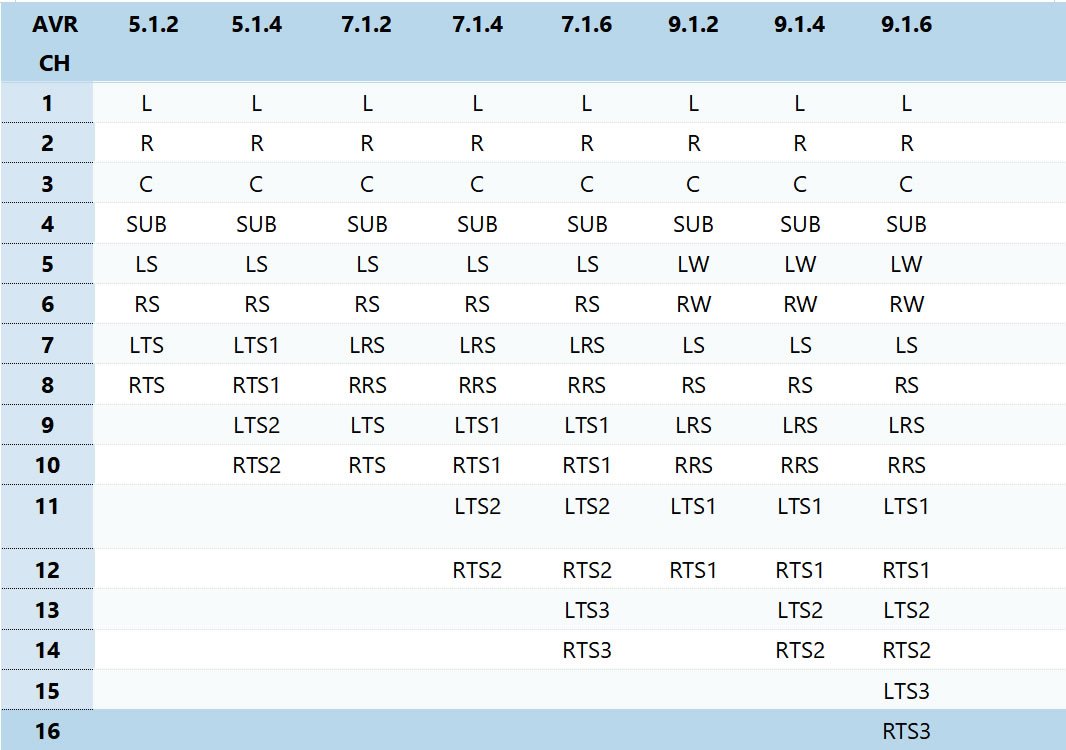
The AmpVortex-16060A uses professional-grade speaker terminals to ensure secure, high-fidelity connections. The functionality of each of the 16 amplifier output channels is determined entirely by the Mode Setting selected in the AmpVortex application (e.g., Full Multi-Room vs. Hybrid Theater Mode).
4.1. Surround Connection (AVR Channels)
When a Surround (AVR) configuration is active (e.g., 5.1, 7.1, 5.1.2, 10.4.6), a specific group of the 16 amplifier channels is dynamically assigned to the home theater space.
- Terminal Type:High-quality 5-Way Binding Posts (or similar professional terminals) are used for reliable connection to all surround, main, and height speakers.
- Assignment Logic:The channels are assigned sequentially (e.g., Channels 1-10 may be designated for the Front L/R, Center, Surrounds, and Height speakers in a 5.1.2 setup).
- Subwoofer:The Subwoofer (.1) signal is typically managed via a dedicated Line Out (or the Analog Outputs mentioned earlier) for connection to an active/powered subwoofer.
4.2. Multi-room Zone Connection (Distributed Channels)
Any amplifier channels not assigned to the active Surround setup are automatically designated for Multi-room use, based on the Hybrid Mode setting.
- Terminal Type:The same high-quality speaker terminals are used for all zones.
- Assignment Logic:The remaining channels are paired to create stereo zones (e.g., Channels 7 & 8 form Zone 4 Stereo; Channels 9 & 10 form Zone 5 Stereo, and so on).
- System Setup:The installer defines the number of zones and assigns the remaining available channels to power the pre-wired speakers in those areas (e.g., Kitchen, Patio, Bedroom).
5. Surround Equalization and Room Correction
5.1. Surround Equalization
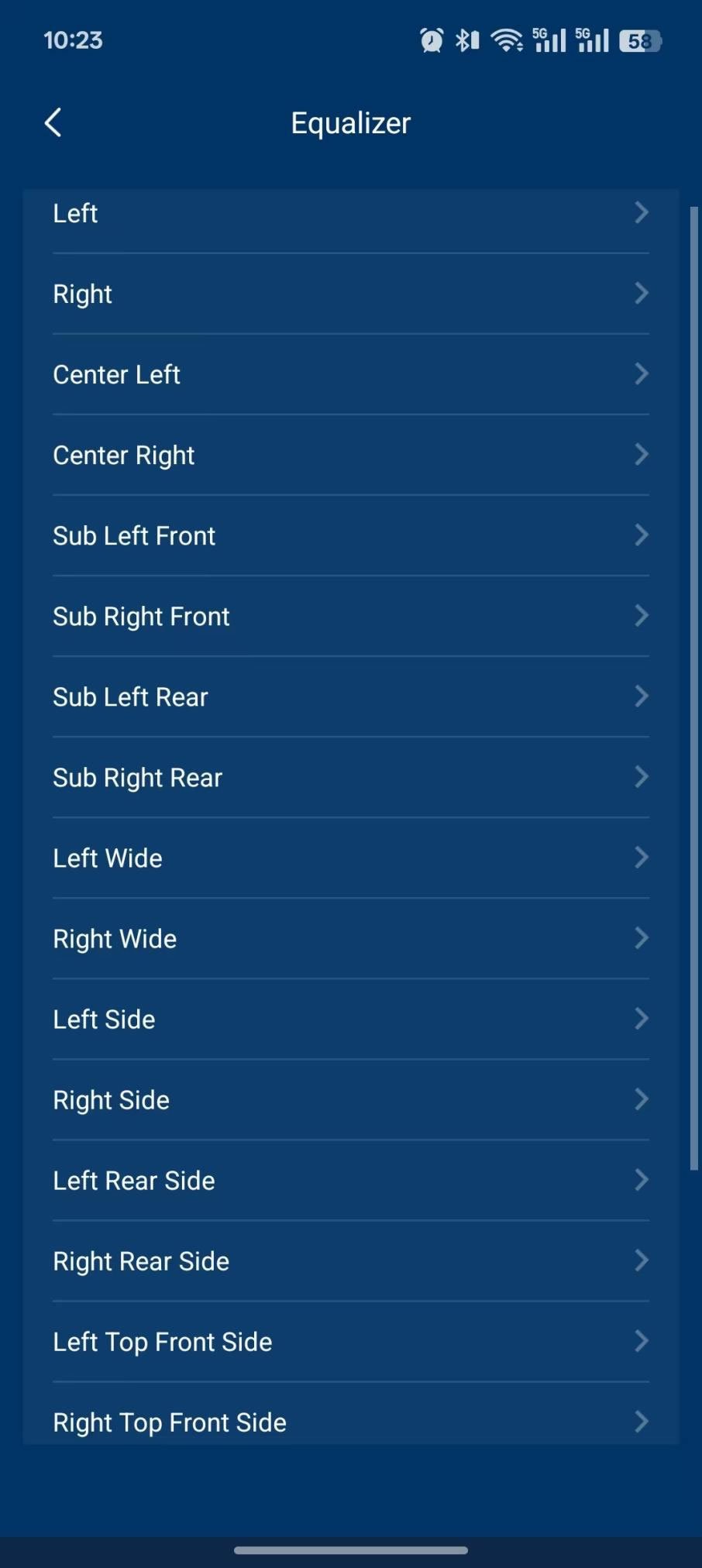
Both Surround Equalization and Multi-room EQ share the fundamental objective of achieving precise acoustic correction and optimization within their designated zones. While they are functionally similar in their goal—to flatten the frequency response and correct time alignment—they primarily differ in their operational interface and scope: Surround EQ focuses on the central home cinema sound field, whereas Multi-room EQ manages optimization across several discrete zones. Critically, the AmpVortex system masters both principles, providing intuitive control over its core equalization engine regardless of whether you are fine-tuning the primary 7.1.4 soundstage or deploying synchronized, acoustically optimized audio to three different zones simultaneously.
5.2. AmpVortex LiveTune Room Correction
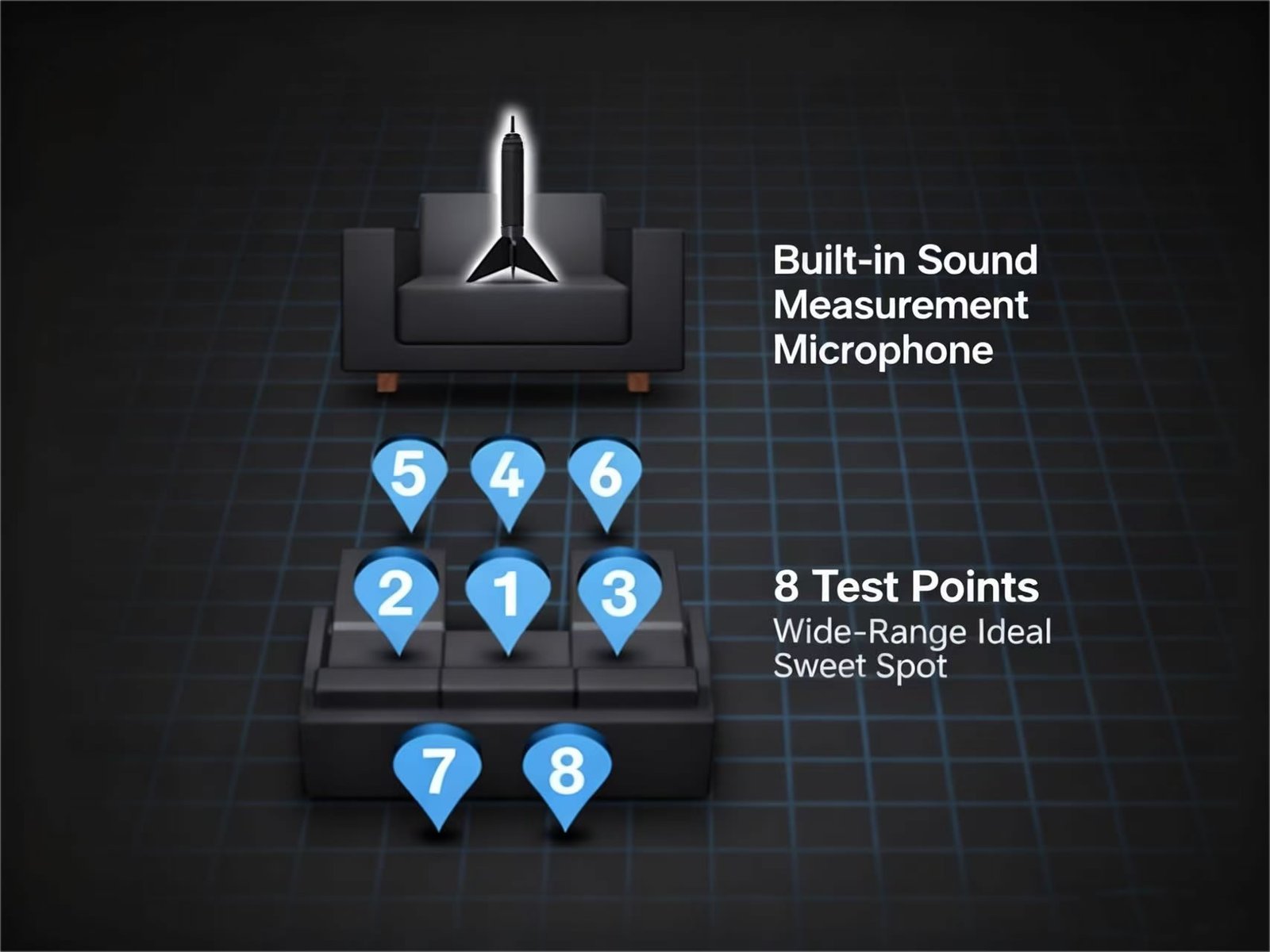
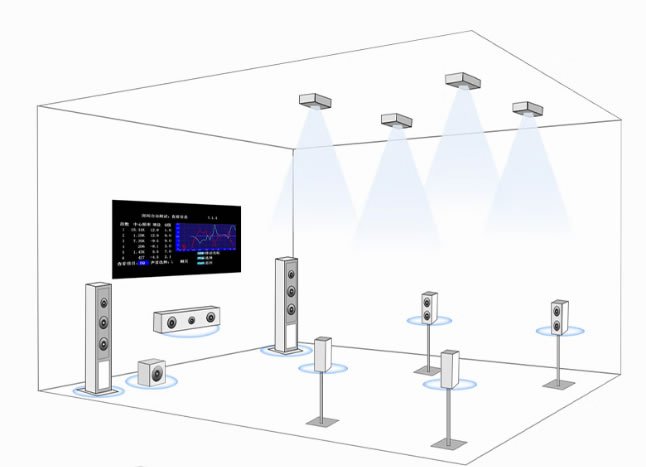
Features a built-in LiveTune room correction function and includes a dedicated test microphone for accurate setup and calibration, delivering an enhanced listening experience tailored to your room.
AmpVortex LiveTune: Real-Time Dynamic Acoustic Optimization
LiveTune is a proprietary DSP (Digital Signal Processing) technology integrated into the core of the AmpVortex processor and amplifier system. It represents our ultimate commitment to multi-room audio optimization, delivering real-time, intelligent, and dynamic sound calibration.
LiveTune elevates traditional “set-it-and-forget-it” room correction to a state of continuous adaptation. It utilizes sophisticated algorithms and integrated microphone arrays to constantly monitor the environment and eliminate acoustic imperfections, ensuring the sound remains pristine in every room, at every moment.
Core Advantages of LiveTune
| Feature | Functional Description | User Value Proposition |
| Real-Time Environment Adaptation | The system continuously monitors acoustic properties, compensating for changes caused by temperature shifts, open doors, drawn curtains, or even the presence and movement of people. | Audio performance is never compromised. The system automatically micro-adjusts to maintain perfect tonal balance and precise imaging, whether you are hosting a party or enjoying a quiet moment. |
| Persistent Optimization | After the initial setup calibration, LiveTune immediately takes over, performing continuous, millisecond-level micro-adjustments and compensations. | “Calibrate once, experience perfection forever.” Users never have to worry about room configuration changes or seasonal variations degrading the sound quality. |
| Zone-Specific Precision | LiveTune creates and maintains an independent, dynamically adapting acoustic profile for every single audio zone (e.g., bedroom, living room, kitchen). | Even when the living room is playing a movie and the kitchen is playing background music, the sound in every room is independently optimized and perfectly calibrated. |
| Transient Error Cancellation | Specifically targeting the low frequencies, LiveTune eliminates standing wave effects and bass muddiness in real-time, ensuring bass transients are clean, tight, and impactful. | Bass no longer “booms.” The transition between the subwoofer and main speakers is seamless, and movie explosions and music kick drums are delivered with maximum impact and control. |
Summary of Application
LiveTune ensures that AmpVortex is not just an amplifier that provides power, but an intelligent acoustic steward. It removes the acoustic limitations of the home environment, allowing you to focus on the music and film itself, without distortion from room flaws.