(317)516-7460
  service@ampvortex.com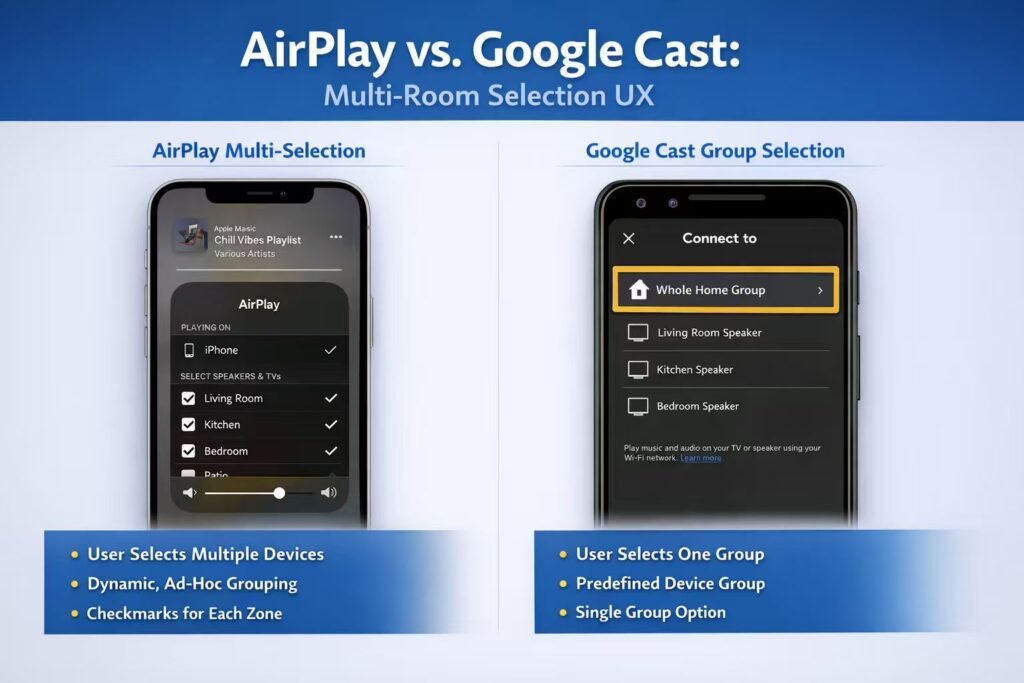
AirPlay Multi-Selection vs. Google Cast Group: Multi-Room Audio UX Explained
AirPlay Multi-Selection vs. Google Cast Group
Why Multi-Room Audio Feels So Different — and How AmpVortex Supports Both
In modern multi-room audio systems, AirPlay and Google Cast are often treated as “similar wireless streaming technologies.”
In reality, they are built on fundamentally different control models, especially when it comes to multi-room playback.
This difference becomes most obvious in one simple question:
Can users select multiple rooms directly from their phone?
The answer reveals everything.
1. AirPlay Multi-Selection: User-Driven, Device-Level Control
How AirPlay Multi-Selection Works
With AirPlay (especially AirPlay 2), users can:
- Open a music app on iPhone/iPad
- Tap the AirPlay icon
- Select multiple output devices at the same time
- Instantly hear the same content across several rooms
From the user’s perspective:
- Multi-room playback is explicit
- Room selection is dynamic
- Grouping can change every time you play
What’s Happening Under the Hood
Technically, AirPlay multi-selection means:
- The sender (iPhone/iPad) knows about all selected receivers
- Each receiver maintains its own session
- Synchronization is coordinated by the AirPlay system
- The phone acts as a central controller, not just a remote
Strengths of AirPlay Multi-Selection
- Extremely intuitive
- No pre-configuration required
- Perfect for ad-hoc grouping (e.g. “Living Room + Kitchen + Balcony”)
Limitations
- Works best inside the Apple ecosystem
- Session stability depends partly on the sender device
- Less suitable for fully autonomous, long-running playback without user presence
2. Google Cast: Group-Based, System-Managed Playback
Why Google Cast Has No “Multi-Selection”
In Google Cast–enabled apps:
- Users can select only one target
- There is no checkbox-style multi-selection UI
This is by design, not a missing feature.
The Google Cast Group Model
Multi-room playback in Google Cast works like this:
- Multiple Cast devices are pre-grouped (e.g. via Google Home)
- The group itself appears as one virtual Cast target
- The user selects the group
- All devices in the group play in sync
From the user’s perspective:
- They select one destination
- That destination may represent many rooms
Under the Hood
- Google Cast creates a single playback session
- Audio timing and synchronization are handled at the system level
- Individual devices in the group are not addressed independently during playback
Strengths of Google Cast Groups
- Very stable synchronization
- Minimal dependency on the phone after playback starts
- Ideal for “set and forget” whole-home playback
Limitations
- Groups are static (not ideal for quick, temporary combinations)
- Users cannot dynamically select arbitrary subsets at play time
- Less flexible for advanced routing scenarios
3. AirPlay vs. Google Cast: Core Differences at a Glance
| Aspect | AirPlay Multi-Selection | Google Cast Group |
| Multi-room selection | Dynamic, user-selected | Predefined groups |
| UI behavior | Multiple devices checked | Single group selected |
| Control model | Sender-driven | System-driven |
| Flexibility | Very high | Moderate |
| Stability (long play) | Good | Excellent |
| Ecosystem focus | Apple | Cross-platform |
4. Why This Matters for Multi-Zone Amplifiers
In a professional multi-zone amplifier or matrix system, the control model matters as much as the audio quality.
- AirPlay emphasizes user choice and spontaneity
- Google Cast emphasizes system stability and simplicity
Treating them as interchangeable often leads to confusion or poor UX.
5. How AmpVortex Handles Both — Correctly
AmpVortex is designed as a true multi-zone audio platform, not a single-stream speaker.
As such, it supports both AirPlay and Google Cast, each in a way that respects their native design philosophy.
AirPlay on AmpVortex
- Each zone appears as an independent AirPlay target
- Users can freely multi-select zones from iOS
- Ideal for ad-hoc grouping and Apple-centric households
Google Cast on AmpVortex
- Each zone is a Cast receiver
- Zones can be grouped using the Google Cast Group mechanism
- Ideal for stable, whole-home playback across Android and mixed ecosystems
AmpVortex does not attempt to “force” Google Cast into an AirPlay-style UX, nor does it restrict AirPlay to static groups.
Instead, it lets each protocol behave as intended — while the underlying amplification and routing system ensures reliable multi-zone output.
6. The Bigger Picture: Control Philosophy, Not Just Protocols
The difference between AirPlay multi-selection and Google Cast is not about features—it’s about who controls the system:
- AirPlay: the user’s device decides, every time
- Google Cast: the system decides, once
AmpVortex is built to support both philosophies, giving installers and users the freedom to choose the experience that best fits each scenario.
Conclusion
AirPlay and Google Cast approach multi-room audio from opposite directions.
Understanding this difference is essential when designing or deploying a serious multi-zone audio system.
By supporting both—without compromising either—AmpVortex enables flexible, stable, and intuitive multi-room playback across platforms.