(317)516-7460
  service@ampvortex.com
Update Ampvortex series for KNX support
There are two parts need to updating:
1\ Ampvortex firmware.
2\ Ampvortex app
Firmware versions for Ampvortex series for KNX support below:
Ampvortex-16060: firmware version upper 2.3.44
Ampvortex-16100: firmware version upper 2.4.41
Ampvortex-16060G: firmware version upper 2.6.11
Ampvortex-16060A: firmware version upper 2.5.47
Ampvortex app version for KNX support below:
iOS: version upper 4.1.27
Android: version upper 4.1.27
Section 1: Firmware update
To update the Ampvortex firmware, you will need a USB drive.
Follow the step-by-step instructions:
For example, update Ampvortex-16060G firmware.
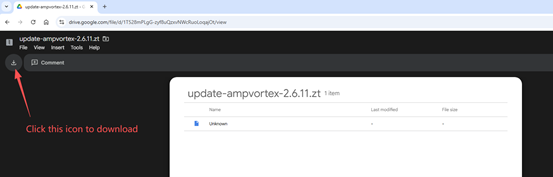
1\ Download the firmware from the Google Drive link:
https://drive.google.com/file/d/1T528mPLgG-zyf8uQzxvNWcRuoLoqajOt/view?usp=sharing
The firmware is a single file named update-ampvortex-2.6.11.zt
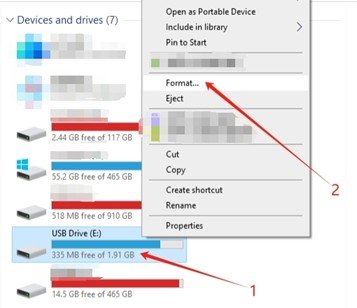
2\ Format your USB drive using the exFAT file system.
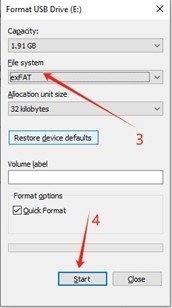
3\ Copy the firmware file into the USB drive. Ensure there is only one firmware file on the USB drive.
4\ Plug the USB drive into the device’s USB port. After a few seconds, the STATUS LED on the front panel will start blinking white-green. Do not turn off the device during this process.
5\ Wait until the LED turns solid white, indicating the firmware update is complete.
6\ Remove the USB drive from the device.
7\ Close the Ampvortex app completely, then relaunch it. Verify the firmware version by navigating through the Ampvortex app UI:
Go to the “Device” tab → “Config” → “Device Info” → “Firmware Version.” Confirm the version is 2.6.11.
8\ If the firmware version is not 2.6.10, power off the amplifier, turn it back on, and repeat steps 4 to 7.
iOS
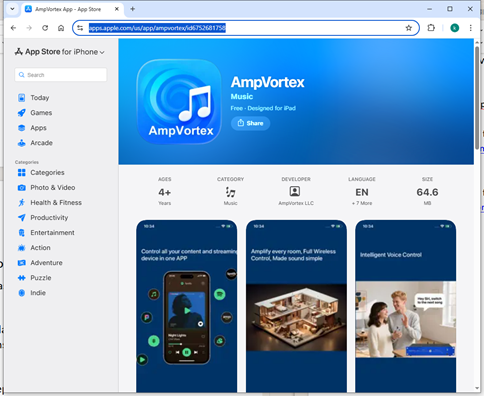
Install Ampvortex app from Appstore link:
https://apps.apple.com/us/app/ampvortex/id6752681758
Android
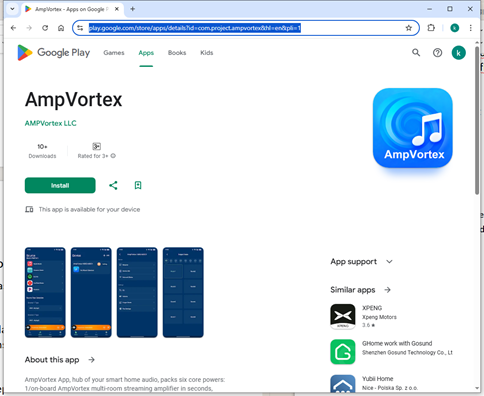
Install Ampvortex app from Google Play link:
https://play.google.com/store/apps/details?id=com.project.ampvortex&hl=en&pli=1