(317)516-7460
  service@ampvortex.com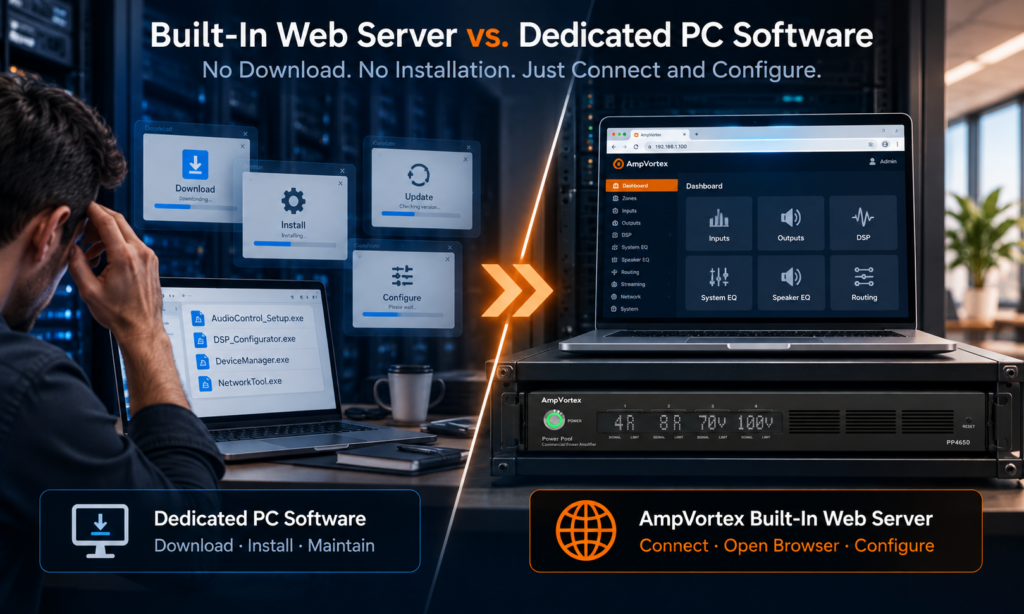
Why AmpVortex Power Pool Commercial Amplifiers Use a Built-In Web Server Instead of Dedicated PC Software
Modern commercial amplifiers provide far more than power amplification.
DSP, matrix routing, EQ, input and output configuration, loudspeaker settings, system monitoring and network management have all become part of the modern commercial audio system.
However, there is still an important question:
How do you access all these functions?
Many professional audio products rely on dedicated PC software. Before an engineer can configure or troubleshoot the amplifier, the correct application must first be found, downloaded and installed on a compatible computer.
AmpVortex Power Pool Commercial Amplifiers take a different approach.
The configuration interface is built directly into the amplifier through an integrated Web Server.
No dedicated configuration software needs to be downloaded or installed. Connect to the amplifier, open a supported web browser, and the system is ready to configure.
This difference becomes particularly important not only during initial commissioning, but throughout the entire lifecycle of a commercial audio installation.
The Configuration Interface Travels with the Amplifier
With conventional PC-software-based systems, the configuration interface exists outside the amplifier.
The amplifier may contain the DSP and processing hardware, but the technician still depends on an external software package to access it.
That creates an additional layer between the engineer and the system:
Amplifier → Dedicated PC Software → Compatible Computer → Engineer
AmpVortex simplifies this relationship:
Amplifier with Built-in Web Server → Standard Browser → Engineer
The configuration environment is delivered by the amplifier itself.
This means the engineer does not need to prepare a computer with AmpVortex-specific configuration software before accessing the system.
No Download. No Installation. No Dedicated Configuration Application.
This sounds simple, but it solves several practical problems.
With dedicated configuration software, a service engineer may need to determine:
- Which software package is required?
- Where can it be downloaded?
- Which version should be installed?
- Is it compatible with the computer being used?
- Does the technician have permission to install software on that computer?
For a new installation, these steps may simply be inconvenient.
During an urgent service situation, however, they can become a real operational problem.
With AmpVortex, there is no dedicated PC configuration application to install.
The technician accesses the Power Pool amplifier through its Web Server using a supported browser.
The tool required to configure the amplifier is already inside the amplifier.
Why This Matters in an Emergency
Commercial audio systems often operate in environments where downtime matters.
Imagine a hotel ballroom preparing for an event that starts in one hour.
The audio routing is incorrect.
A restaurant suddenly needs an audio configuration changed before opening.
A conference room has an unexpected level or DSP issue shortly before an important meeting.
The engineer arrives with a laptop—but the manufacturer’s proprietary configuration software is not installed.
Now troubleshooting cannot begin immediately.
The engineer first has to locate the software, download it, install it, make sure the correct version is being used, and then connect to the system.
The technical problem may be simple.
Accessing the system becomes the difficult part.
AmpVortex is designed to remove that unnecessary barrier.
Connect to the appropriate network, access the amplifier through a browser, and begin diagnosis and configuration.
When time matters, fewer dependencies mean faster response.
One Interface for the Power Pool Platform
The Web Server is not limited to one special function.
It serves as the primary configuration environment for the Power Pool Commercial Amplifier platform.
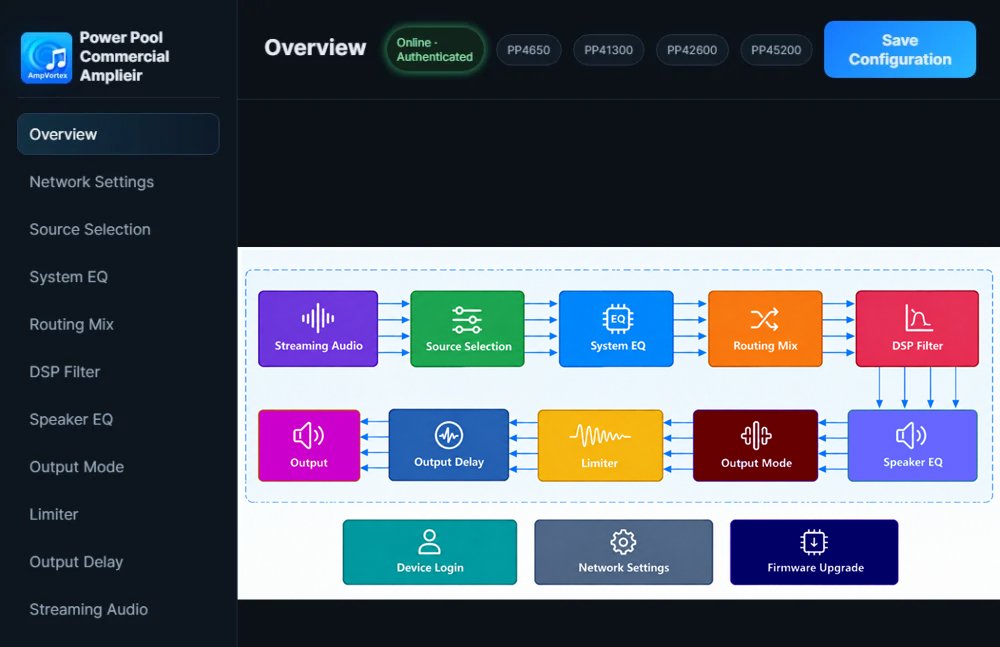
Depending on the model and system configuration, the browser-based interface provides access to key functions such as:
DSP processing · System EQ · Speaker EQ · Matrix routing · Input and output configuration · Source management · Amplifier settings · Zone management · System status and other system parameters
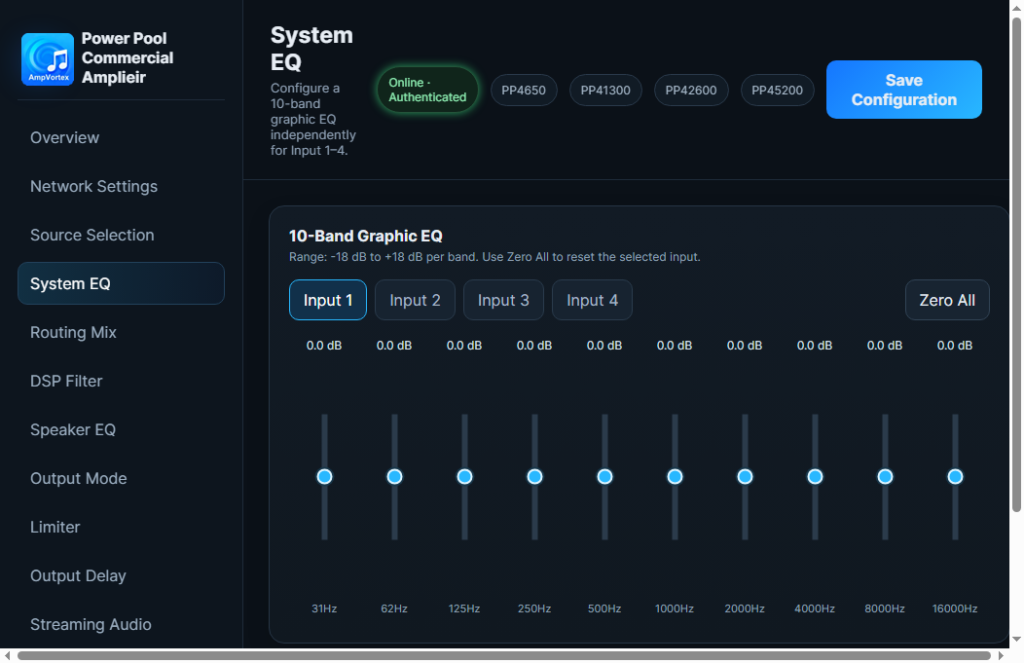
This is an important distinction.
AmpVortex has not simply added a small web page for checking amplifier status.
The Web Server is a fundamental part of the amplifier’s configuration architecture.
Any Suitable Service Computer Can Be Ready Faster
Commercial AV integrators work with equipment from many manufacturers.
If every manufacturer requires its own PC application, the service laptop gradually becomes a library of proprietary configuration software.
Software A for one amplifier.
Software B for another DSP.
Software C for another processor.
Possibly multiple versions of each.
This creates unnecessary dependency on the technician’s computer.
A browser-based architecture changes the relationship.
The engineer does not need an “AmpVortex computer.”
They need a suitable computer, network access and a supported web browser.
That makes it much easier for another engineer to take over a project, especially when the original commissioning engineer is unavailable.

The Advantage Becomes Greater Years After Installation
Commercial audio systems can remain installed for many years.
The laptop used to commission the system may be gone.
The original engineer may have moved to another company.
The manufacturer’s software may have changed.
The new technician may have never worked on that particular installation before.
Yet the amplifier is still there.
This is where an integrated Web Server has a major lifecycle advantage.
The configuration interface remains associated with the equipment rather than with the computer that originally commissioned it.
For long-term commercial installations, that can be far more important than saving a few minutes during initial setup.
Easier Technical Support Across Countries
Commercial projects increasingly involve multiple organizations.
A project in Africa, the Middle East, Europe or Asia may involve a local installer, regional distributor, system integrator, consultant and manufacturer technical team.
When troubleshooting begins, requiring a particular PC application introduces another possible point of friction.
With a browser-based system, technical support can focus much more quickly on the actual configuration.
Instead of beginning with:
“Do you have our configuration software installed?”
the conversation can begin with:
“Can you access the amplifier’s Web Server?”
That is a much better starting point for remote technical support.
Particularly Valuable for Hospitality and Multi-Site Projects
Consider a hotel group with multiple properties.
Or a restaurant chain with dozens of locations.
Or a commercial integrator maintaining audio systems across schools, offices and retail stores.
The technician visiting those sites should not have to maintain a collection of manufacturer-specific applications simply to access basic system configuration.
With AmpVortex Power Pool, the workflow remains consistent:
Connect → Open Browser → Access Web Server → Diagnose → Configure
This makes the platform particularly suitable for distributed commercial deployments where long-term serviceability matters.
Dedicated PC Software vs. AmpVortex Web Server
| Dedicated PC Software | AmpVortex Web Server |
Software download | Required | Not required |
Software installation | Required | Not required |
Dedicated manufacturer application | Required | Not required |
Browser access | Usually not primary configuration method | Yes |
Configuration interface | Resides on service PC | Built into amplifier |
New service computer | Software must be prepared | Open browser and connect |
Emergency troubleshooting | Software availability can delay access | Fewer steps before diagnosis |
Long-term servicing | Depends partly on external software environment | Interface remains with system |
Multi-site maintenance | Multiple software installations may need management | Consistent browser-based workflow |
This Is More Than Convenience
It would be easy to describe browser-based configuration simply as a convenience feature.
For AmpVortex, it represents something more fundamental.
A commercial amplifier is infrastructure.
Once installed in a hotel, restaurant, school, office building or retail property, it may remain there for many years and be serviced by many different people.
The configuration architecture should therefore not assume that the same laptop, the same engineer or the same software installation will always be available.
The system should carry its own management interface.
That is the philosophy behind the AmpVortex Web Server.
Built for Installation Day—and the Years After
Good commercial audio engineering is not only about what happens when a system is first commissioned.
It is also about what happens at 8:00 PM three years later when an event is about to begin and somebody needs to access the amplifier immediately.
At that moment, nobody wants to search for an installation package.
Nobody wants to discover that the service laptop does not have the required application.
Nobody wants software installation to become the first troubleshooting task.
They simply need to access the system.
With AmpVortex Power Pool Commercial Amplifiers:
No dedicated PC software to find.
No configuration application to download.
No installation before accessing the amplifier.
Connect. Open a browser. Access the Web Server. Start working.
That is not just easier configuration.
It is a commercial audio platform designed for real-world serviceability.
Learn more at www.ampvortex.com