(317)516-7460
  service@ampvortex.com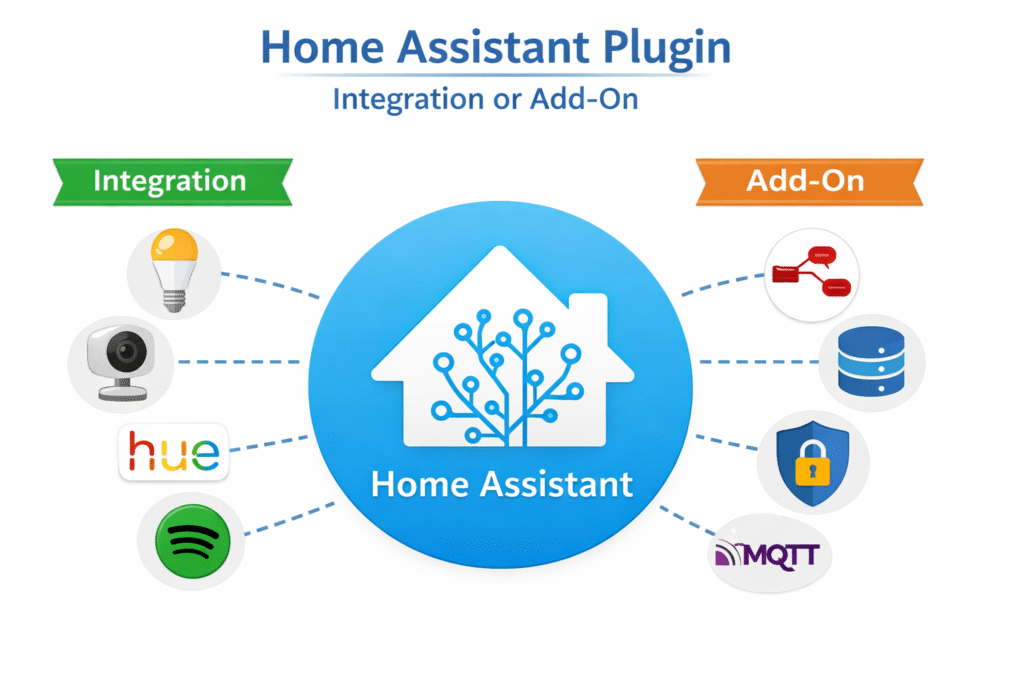
What is a Home Assistant Plugin?
Home Assistant has become one of the most popular platforms for smart home automation, offering flexibility, extensive device support, and powerful customization options. A key part of this ecosystem is the Home Assistant plugin. But what exactly is it, and why is it important for smart home enthusiasts?
Understanding Home Assistant Plugins
A Home Assistant plugin, often referred to as an integration or add-on, is a software component that extends the functionality of the Home Assistant platform. Plugins allow Home Assistant to communicate with a wide variety of smart devices, services, and applications, making your smart home more connected and automated.
Plugins can be divided into two main categories:
- Integrations
- These are built-in or community-created components that connect Home Assistant to specific smart devices or online services.
- Examples include Philips Hue, Xiaomi Aqara sensors, Nest Thermostat, Spotify, and AmpVortex multi-room audio systems.
- Add-ons
- These are self-contained applications that run alongside Home Assistant to provide extra functionality.
- Examples include Node-RED for advanced automation, MQTT brokers for device communication, or databases like MariaDB for logging and analytics.
Why Home Assistant Plugins are Important
Home Assistant plugins are essential because they allow users to:
- Connect different devices and brands: Without plugins, your smart lights, thermostats, cameras, and speakers may not communicate with each other.
- Automate tasks efficiently: Plugins enable automation, such as turning on lights when motion is detected or adjusting temperature based on occupancy.
- Enhance functionality: Plugins add features that are not available in the default Home Assistant installation. For example, integrating music systems like AmpVortex-16060A can bring multi-room streaming and immersive audio into your smart home.
- Customize your smart home setup: With plugins, you can tailor the system to your needs, whether for security, convenience, or entertainment.
How to Install a Home Assistant Plugin
Installing plugins is usually straightforward:
- For integrations:
- Go to Settings → Devices & Services → Add Integration.
- Search for your device or service and follow the setup instructions.
- For add-ons:
- Navigate to Settings → Add-ons → Add-on Store.
- Select the add-on you want, install it, and configure it according to your needs.
Once installed, most plugins can be used in automations, scripts, dashboards, and voice control, providing a seamless smart home experience.
Real-Life Examples
- Smart Lighting: Use an integration plugin to control Philips Hue or LIFX lights based on schedules, sunrise/sunset, or occupancy.
- Multi-Room Audio: With an AmpVortex plugin, you can stream music to different rooms, set volume levels, and automate playback based on time or events.
- Home Security: Integrate cameras, motion sensors, and door locks to receive alerts or trigger automations.
Conclusion
In essence, a Home Assistant plugin is a bridge that connects your smart home devices, services, and applications, enabling automation, customization, and enhanced functionality. Whether you are a beginner setting up a few smart bulbs or an advanced user integrating a full smart home ecosystem, plugins are what make Home Assistant truly powerful and versatile.