(317)516-7460
  service@ampvortex.com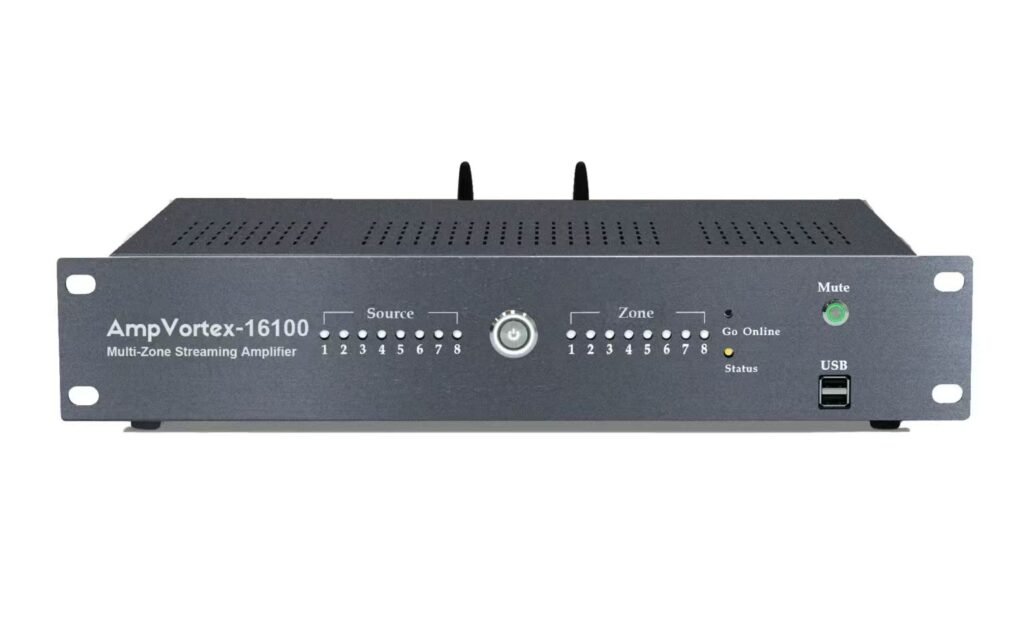
Operation Guide: Integrating AmpVortex-16100 with Google Home
1. Industry-Leading Connectivity & Brand Vision
The AmpVortex Series Multi-room Streaming Amplifiers are engineered to dissolve the barriers of smart home audio, providing a seamless distribution experience for users worldwide. We are proud to announce that the entire AmpVortex lineup is Matter-certified, ensuring native, high-performance interoperability with the world’s leading smart home platforms:
- Apple Home (HomeKit)
- Google Home
- Amazon Alexa
- Samsung SmartThings
- Home Assistant
Whether you are a Google Nest enthusiast or a professional integrator, AmpVortex delivers stable, high-fidelity audio. Today, we will use the AmpVortex-16100 as an example to demonstrate how to integrate your system into the Google Home ecosystem via the Matter protocol.
For technical inquiries, please visit our official support center: www.ampvortex.com.
2. Preparation & Environment Requirements
Before beginning the setup, ensure your network and hardware are ready for a smooth integration:
- Hardware Power: Connect your AmpVortex-16100 to your speaker system and power it on. Confirm the status LED indicates it is ready for pairing.
- Google Home Hub: Ensure you have a Matter-enabled Google Nest device (such as a Nest Hub 2nd Gen, Nest Mini, or Nest Wifi Pro) active in your home to act as a Matter Controller.
- Mobile App: Ensure the latest version of the Google Home App is installed on your Android or iOS device, and Bluetooth is enabled.
3. Standardized Setup (Scan to Connect)
AmpVortex utilizes Matter’s simplified “Option A” setup process. There is no need to manually enter Wi-Fi passwords:
- Open Google Home: Launch the Google Home App on your smartphone.
- Add Device: Tap the “+” icon (Add) and select “Set up device” > “New device.”
- Scan Matter QR Code: When prompted, use your phone’s camera to scan the Setup Code located on the back or bottom of the AmpVortex-16100.
- Confirm Connection: Google Home will automatically detect the AmpVortex amplifier. Tap “Set up” and follow the prompts to connect it to your Wi-Fi network.
4. Eight-Zone Assignment & Room List
Assigning your AmpVortex-16100 to specific rooms is crucial for voice control. Below is a suggested list of 8 zones for a comprehensive home setup:
| Zone ID | Room Name | Recommended Use Case | Default Volume |
| Zone 1 | Living Room | Main entertainment and social background music. | 60% |
| Zone 2 | Kitchen | High-energy music or podcasts while cooking. | 55% |
| Zone 3 | Master Bedroom | Relaxing evening playlists and morning alarms. | 40% |
| Zone 4 | Dining Room | Sophisticated dinner party atmosphere. | 50% |
| Zone 5 | Home Office | Lo-fi beats or classical music for focus. | 35% |
| Zone 6 | Patio | Outdoor entertainment and BBQ parties. | 75% |
| Zone 7 | Master Bath | High-quality audio for a spa-like experience. | 50% |
| Zone 8 | Guest Room | Independent audio control for visitors. | 45% |
5. Advanced Control & Dual-App Sync
The AmpVortex-16100 provides a “Single Pane of Glass” control experience through Google Home:
- Media Panel: Access the Google Home Media Panel to see all active streams. You can adjust volumes for individual zones or the entire group simultaneously.
- Mute/Unmute: A single tap on the speaker icon in the Google Home UI instantly mutes or unmutes the zone.
- Two-Way Sync Implementation:
- Status Real-Time Update: If the volume is changed via the AmpVortex App, the Google Home slider will move to the exact same percentage instantly.
- Unified Control: Any changes made by Google Assistant voice commands are immediately visible within the AmpVortex App.
6. Google Assistant Voice Commands
Control your AmpVortex-16100 hands-free using natural language:
- “Hey Google, play some Jazz in the Living Room.”
- “Hey Google, set the Kitchen volume to 60%.”
- “Hey Google, mute the Patio speaker.”
- “Hey Google, unmute the Master Bedroom.”
- “Hey Google, stop the music everywhere.”
7. Maintenance & Support
For the best experience, ensure your AmpVortex-16100 remains connected to the internet for automatic firmware updates.
- Website: www.ampvortex.com
- Email Support: service@ampvortex.com